 Suomi
Suomi Français
 Deutsch
 Polski
Sense-check your Salesforce setup
Talk through your current systems and processes to see if Automotive Cloud fits, and what it would actually take to run it properly.



Most teams don’t go looking for something like Salesforce Automotive Cloud specifically. They just end up considering it, after problems start to stack up.
Leads come in, but they don’t land in the right place. Dealers follow up differently. Service teams can’t see what sales promised. Someone pulls a report and spends ten minutes explaining why the numbers don’t match. Eventually, a standard CRM doesn’t feel like enough.
With Automotive Cloud, Salesforce gives companies more directly tuned to their problems. The platform brings together the parts that usually sit in different systems. Customers, vehicles, ownership, service history, finance, dealer activity, all in one place. Instead of stitching tools together, you’re working from a single cloud for automotive operations.
Interest has been picking up as connected vehicles grow. Around 327 million are expected on the road by 2027, which means more data flowing through the same journey and more chances for things to drift if it isn’t connected.
Deloitte’s latest study also looked at over 28,500 consumers across 27 countries, and found people expect ongoing relationships with brands, not one-off transactions.
That’s where Salesforce automotive CRM starts to make sense. Not as a replacement for a lead tracker, but as something that can follow a customer and a vehicle over time without everything breaking in between.
Salesforce Automotive Cloud is a CRM used by automotive teams that need customer, vehicle, and partner data to sit together, not across separate systems that don’t line up.
What makes Salesforce for automotive industry solutions different is the focus. Most CRMs are designed around people and deals. Automotive doesn’t really work like that. A single customer might:

Buy through a dealer
Finance through a captive
Service through another location
Come back years later with the same vehicle
And all of that needs to stay connected. With Salesforce auto cloud, everything doesn’t live as separate records. Customer profiles, vehicle ownership, dealer relationship, and financial and service histories are all aligned.
You can also go beyond simply tracking leads, with insights into dealer-to-OEM relationships, vehicle-level records, and service events, all tracked.
Plenty of companies use these Salesforce automotive cloud solutions, from OEMs trying to get visibility across dealer networks, to large dealership groups managing multiple locations, distributors and importers.
Salesforce has been pushing deeper into industry-specific products for a while now. Automotive is one of the more complex ones, and it builds on what used to be known as Vlocity. You can find our guide on what is Vlocity in Salesforce here.
That background matters because a lot of what you see in Salesforce for automotive today, especially around data models and workflows, comes from that Industries layer.
Salesforce Auto Cloud builds on the core Salesforce platform and adds the automotive layer on top.
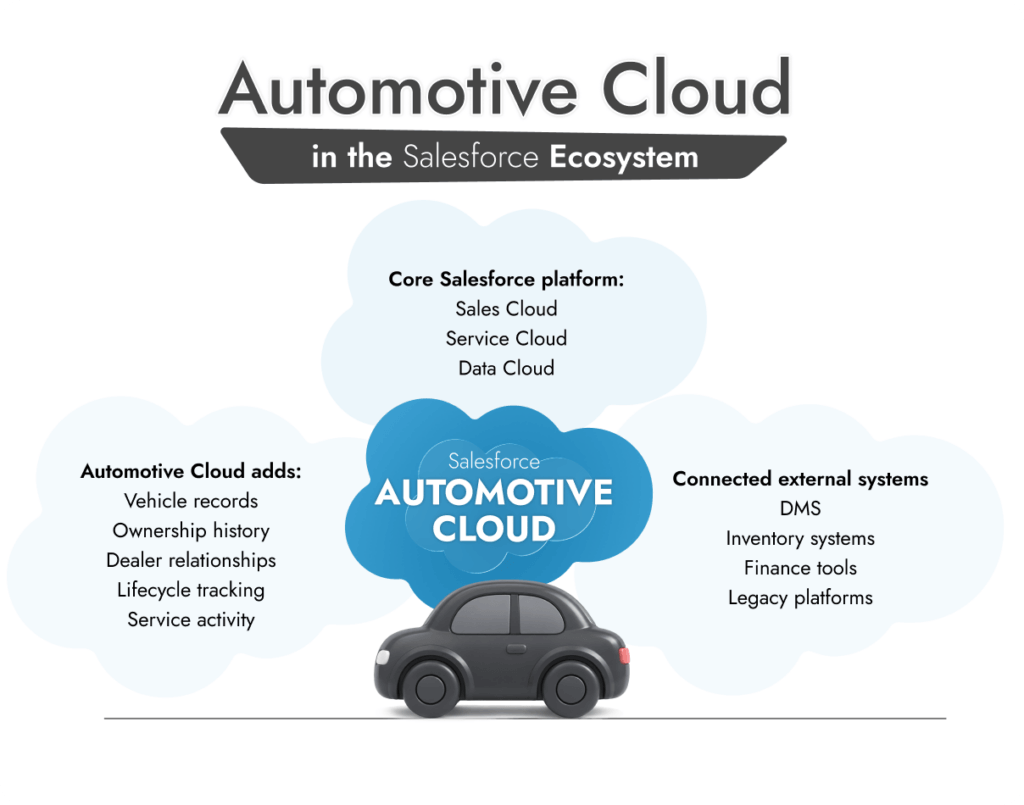
So you’re not starting from scratch. You’re working inside:

Sales Cloud for pipeline and lead flow
Service Cloud for support and aftersales
Data Cloud if you’re pulling in data from multiple sources
Then Automotive Cloud adds structure around vehicles, dealers, and lifecycle tracking. That’s where Salesforce auto cloud starts to feel different.
You’re still looking at accounts, contacts, opportunities. But now those sit alongside vehicle records, ownership history, and service activity. The system stops being just about deals and starts behaving more like a record of what’s actually happening across the business.
Automotive businesses rarely run on one system. There’s always:

A DMS
Something handling inventory
Finance tools in the mix
Sometimes older systems nobody wants to touch
Salesforce can connect to all of that. APIs, MuleSoft, connectors, it’s all there. The issue isn’t whether it connects. It’s what happens after. Which system becomes the source of truth, how updates flow, and how conflicts get handled.
Eventually, most companies bring in outside help. Not because the platform is hard to install. It’s not.
But because once you start shaping:

The data model
Integrations
Automation
Small decisions stick.
Working with a team offering Salesforce consulting services tends to be less about “getting it live” and more about not having to rebuild it later.
Get your Salesforce setup right
Plan your Automotive Cloud data model and integrations properly before early decisions start causing problems later.
The data model is what holds everything together. Without it, this is just another CRM.
What Salesforce has done here is pre-build a structure that actually matches how automotive businesses run. So instead of forcing everything into accounts and opportunities, you’re working with records that already make sense:

People
Vehicles
Dealers
Finance and service history
The Salesforce automotive cloud data model links those pieces so you can follow a customer and their vehicle over time without losing context.
You open a record, and you’re not just seeing contact details. You’re seeing:

Customer data. Profiles, contact history, preferences. Sometimes grouped into households if multiple drivers are tied to one account.
Vehicle data. VIN records, service history, lifecycle stages. This is where most teams start seeing real value once data builds up.
Dealer and partner data. Dealer structures, partner roles, territory setup. Especially relevant if you’re working across multiple locations.
Finance, warranty, and rebate data. Loans, leases, warranty coverage, claims, incentives. This is usually tied closely to external systems, so integrations matter here.
That’s the part a standard CRM struggles with. It doesn’t naturally connect those dots.
It’s not automatic though.
Even with the structure in place, teams still need to decide how things should actually work:

How detailed vehicle records should be
How dealers are linked across regions
What finance data lives inside salesforce vs outside
If that’s unclear early on, reporting starts drifting pretty quickly.
See Automotive Cloud in action
Understand how Salesforce fits real automotive workflows, from lead routing to lifecycle tracking across dealers and service teams.
The features only make sense once you look at how teams actually use them.
On paper, a lot of this looks familiar. Dashboards, workflows, automation. Nothing surprising.
But once the data model is in place, the features start behaving differently. They’re not just tools sitting on top of a CRM. They’re tied directly to vehicles, ownership, and dealer activity.
That’s where Salesforce automotive cloud features feel more specific to the industry.
Feature | What it actually helps with | Who benefits most |
Driver Console | Full customer view across interactions and ownership | Sales, service |
Vehicle Console | Tracks vehicle history, service, warranty | Service teams |
Lead Management | Routes and tracks leads across dealers | OEMs, dealer groups |
Lifecycle Management | Connects sale → service → renewal | Sales, retention teams |
Analytics | Tracks performance across dealers and operations | Leadership, ops |
This is where most teams spend their time.
It pulls together everything related to the customer into one view:
Past interactions
Current vehicle
Service history
Open cases or requests
So instead of switching tabs or systems, you’re working from one place. This changes how conversations go. Sales and service teams aren’t guessing what happened before. They can see it.
This switches the view from customer to vehicle.
Instead of asking “who is this person?”, you’re asking: “what’s happening with this car?”
That includes:

Service records
Warranty status
Delivery details
Lifecycle stage
For service teams especially, this tends to be the difference between reacting and actually knowing what’s going on.
Lead routing is one of the first things teams try to fix, and it’s usually messier than expected.
Automotive Cloud adds structure around:

Assigning leads to the right dealer
Tracking follow-up
Keeping visibility at the OEM level
If it’s set up well, leads don’t just disappear into different systems. You can actually see what happened after they were handed off.
This is where the platform starts to stretch beyond sales. It tracks what happens after the deal:

Ownership
Service
Warranty
Eventual upgrade or resale
That matters because most value in automotive doesn’t come from the first transaction. It comes later. Without this, everything resets after the sale. With it, you’ve got continuity.
Reporting only works if the data behind it holds up. When the system is set up properly, you can track:

Dealer performance
Lead conversion
Service activity
Vehicle trends
You can also take advantage of Agentforce to turn the insights you get into action. In fact, companies using Agentforce achieve around a 21% decrease in IT costs, while increasing revenue.
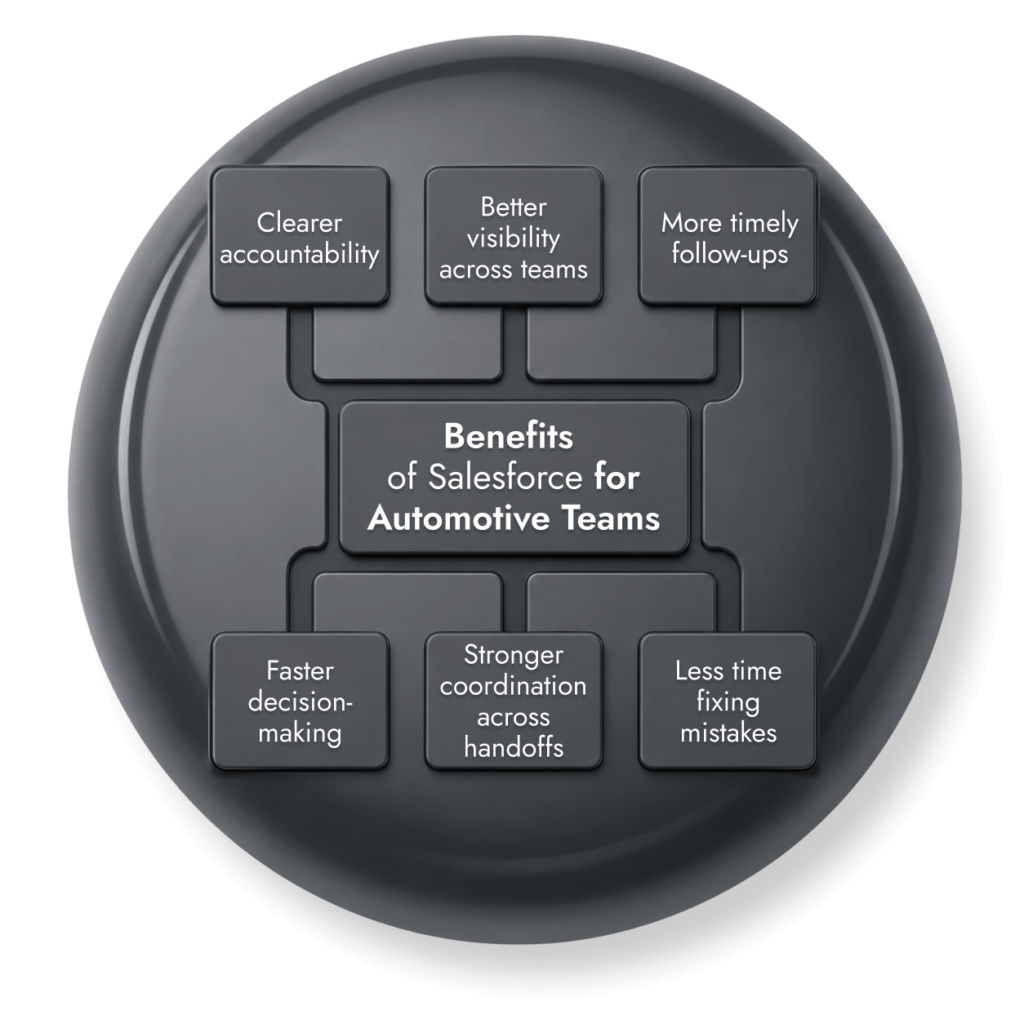
The biggest benefits of Salesforce for Automotive industry teams is how it stops things falling through the cracks. You get:
Visibility: Instead of asking around or checking multiple systems, you can usually see the customer, the vehicle, and recent activity in one place. That alone saves time, especially for service teams.
Coordination: Handoffs don’t rely as much on emails or notes. Sales logs something, service can actually see it. Dealers update a lead, it doesn’t disappear upstream.
Timing: Follow-ups feel less forced. You’re reacting to things that actually happened, a service visit, a warranty change, not just a reminder sitting in a queue.
Accountability: When something slows down, you can trace the problem back to where it actually started.
Decision-making: Once all the data lines up, you spend less time explaining numbers and more time acting on them
Ultimately, companies that use Salesforce spend less time fixing mistakes, and more time improving relationships with customers.
On its own, each part feels familiar. Leads, sales, service. Nothing unusual. The difference is how those pieces stay connected. With Salesforce automotive CRM, a few common patterns start to show up:
Lead routing across dealers: leads don’t just get passed on, they stay visible. You can see who picked them up, how quickly, and what happened after
Vehicle sales tracking: deals aren’t floating on their own, they’re tied to a specific vehicle, which makes delivery, stock, and handover easier to follow
Aftersales and service: when a customer comes back, service teams aren’t starting from zero. They can see what was sold, when, and what’s been done since
Warranty and claims: warranty details and claims sit alongside the vehicle record, so you’re not switching tools just to check coverage
Dealer performance: if you’re running multiple locations, you can start to see patterns, who follows up quickly, who doesn’t, where things slow down
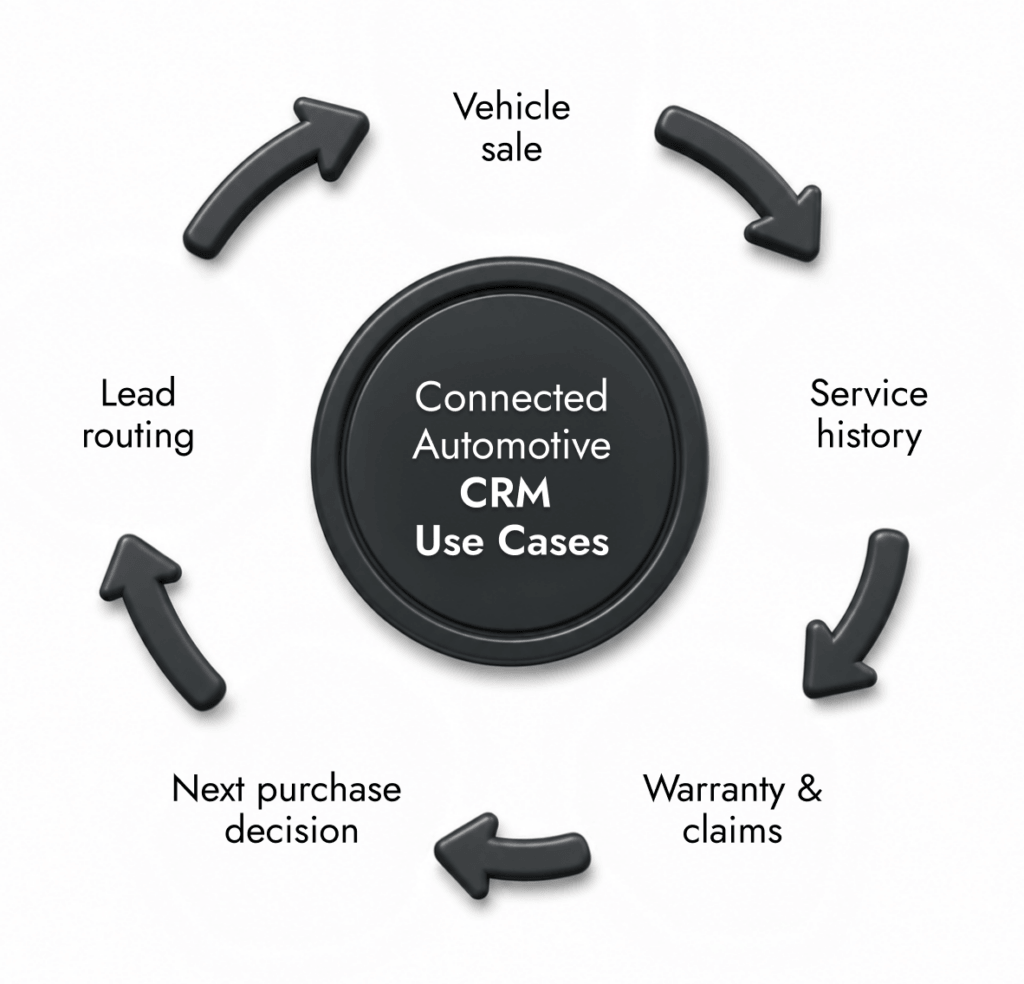
What stands out isn’t any single use case. It’s the fact they don’t reset.
A lead turns into a sale. That sale turns into a service history. That history feeds into the next decision, whether that’s a repair or a replacement.
In most setups, those steps are disconnected. Here, they’re not.
Salesforce shares baseline pricing, which gives a starting point. The current salesforce automotive cloud pricing looks like this:
Edition | Price (Per user/ month) | What you Get |
Enterprise | $350 | Core CRM, apps, sales and service cloud |
Unlimited | $525 | Core CRM, apps, sales and service cloud + unlimited platform customization |
Automotive Cloud Agentforce 1 Sales / Service | $750 | Extended features, AI, deeper capabilities |
What usually catches teams off guard is everything outside the license.
A few things tend to move the number more than expected:

Number of users: straightforward, but adds up quickly across sales, service, and partner teams
Customization: the more the system needs to reflect your exact processes, the more time it takes to build
Integrations: connecting external systems is usually where complexity, and cost, increases
Add-ons: things like data platforms, AI features, or advanced reporting don’t always come in the base package
Implementation scope: a basic rollout vs a multi-system, multi-region setup are completely different projects
Also, if the system isn’t structured properly early on, teams end up fixing broken automation, inconsistent data, and reports that don’t match. That’s usually more expensive than getting it right the first time.
There’s plenty of Salesforce automotive cloud documentation available. Data models, objects, APIs, setup guides. It’s all there.
But reading it and applying it are two different things.
What implementation usually involves looks simple:
Setting up the data model
Connecting external systems
Building automation
Configuring consoles and views
Creating reports
In practice, those pieces overlap. You change one field in the data model, and it affects reporting. You adjust lead routing, and it impacts dealer workflows. Next, you connect a system, and suddenly you’ve got duplicate data.
A few areas tend to need more attention than expected:

Data structure: deciding what lives in Salesforce vs what stays in external systems
Field mapping: making sure data flows cleanly between systems
Automation: avoiding logic that overlaps or conflicts later
User setup: making sure sales, service, and partners see what they actually need
None of this is complicated on its own. It just stacks. There are also platform features that only become useful if they’re set up properly:
Timelines that show activity across records
These features don’t just work once you switch them on. They depend on how the system is set up underneath. Most teams build something, run with it for a bit, then come back and adjust it once real usage kicks in. That’s usually when a Salesforce developer for hire becomes part of the picture.
Plan your Salesforce build properly
Get help structuring your Automotive Cloud setup so data, automation, and integrations stay clean as the system grows.
It’s a good fit when things are already a bit messy. Not before.
If everything still runs fine in one system, or even a couple, this will probably feel like overkill. Where Salesforce automotive cloud starts to make sense is when you’ve already hit a point where:
Data lives in too many places
Teams are working differently across locations
Reporting takes more effort than it should
At that stage, adding another tool won’t help. Connecting what’s already there might.
It’s easier to look at it side by side:
Situation | Fit for Automotive Cloud |
Single dealership, simple sales and service | Probably too heavy |
Dealer group with multiple locations | Starts to make sense |
OEM needing visibility across dealers | Strong fit |
Separate systems for sales, service, finance | Strong fit |
Limited internal resources for CRM management | Risky without support |
There’s also a timing issue. Some teams look at automotive cloud Salesforce early, before processes are clear. That usually leads to overbuilding. Fields nobody uses. automation nobody trusts. Others wait too long. By then, the work is untangling what already exists.
The other piece is ownership. This isn’t something you install and leave alone. Someone needs to:
Keep the data clean
Adjust workflows
Manage integrations
If that role doesn’t exist, things drift.
Salesforce Automotive Cloud is a CRM built for automotive businesses where the work goes beyond customer records. It keeps vehicles, ownership, dealer activity, and service history connected, so teams aren’t chasing information across different systems every time they need context.
Salesforce automotive cloud pricing usually begins around $350 per user each month, depending on the version. That’s only the starting point. Once setup work, integrations, and ongoing updates are included, the total spend tends to be higher.
The main Salesforce automotive cloud features focus on connecting workflows. You get driver and vehicle views, lead routing across dealers, lifecycle tracking, and service visibility. There are also things like timelines and alerts, but their usefulness depends heavily on how the system is configured.
The Salesforce automotive cloud data model links customer records with vehicles, dealers, and finance data. Instead of treating everything separately, it keeps those relationships connected. That’s what allows teams to see ownership history, service activity, and future opportunities without switching systems.
With Salesforce automotive CRM, leads can be assigned to dealers and tracked after handoff. The useful part is visibility. You’re not just sending leads out, you can actually see if they were followed up, how quickly, and what happened next across locations.
Yes, most setups need customization. Even with built-in automotive structures, teams still adjust fields, workflows, and integrations. The platform gives you a starting point, but it won’t match your processes without some level of configuration, especially across dealer networks and service operations.
Yes. Routine Automation works with teams to plan and implement Salesforce setups properly. That usually includes reviewing requirements, shaping the data model, and handling integrations. The goal is to avoid building something that works at launch but becomes difficult to manage later.