 Suomi
Suomi Français
 Deutsch
 Polski
Want to Automate routine?
Contact us to increase customer experience and productivity today.



Recently, I was thinking about why Flow is still considered almost the first way to go when you implement something inside Salesforce.
Flow is out of the box. It is visual and structurual. Colors are beatiful. It is positioned as something that admins can maintain. Apex, on the other hand, is often blamed for being super complex, super custom, expensive to build, and hard to maintain.
In a lot of articles comparing Flow and Apex, Flow is presented as the better option by default. The same advantages are repeated: it is simpler, easier to maintain, requires fewer technical skills, and is generally the recommended way to go.
I started thinking about whether this position is still valid today. With AI coding and vibe-coding tools, many of the historical arguments against Apex are not as strong as they were before. At the same time, I think Flow is often presented as much simpler than it actually is.
My main point is simple: Apex is not that hard, and flows are not that easy. Their complexity is much more equal than people usually assume.
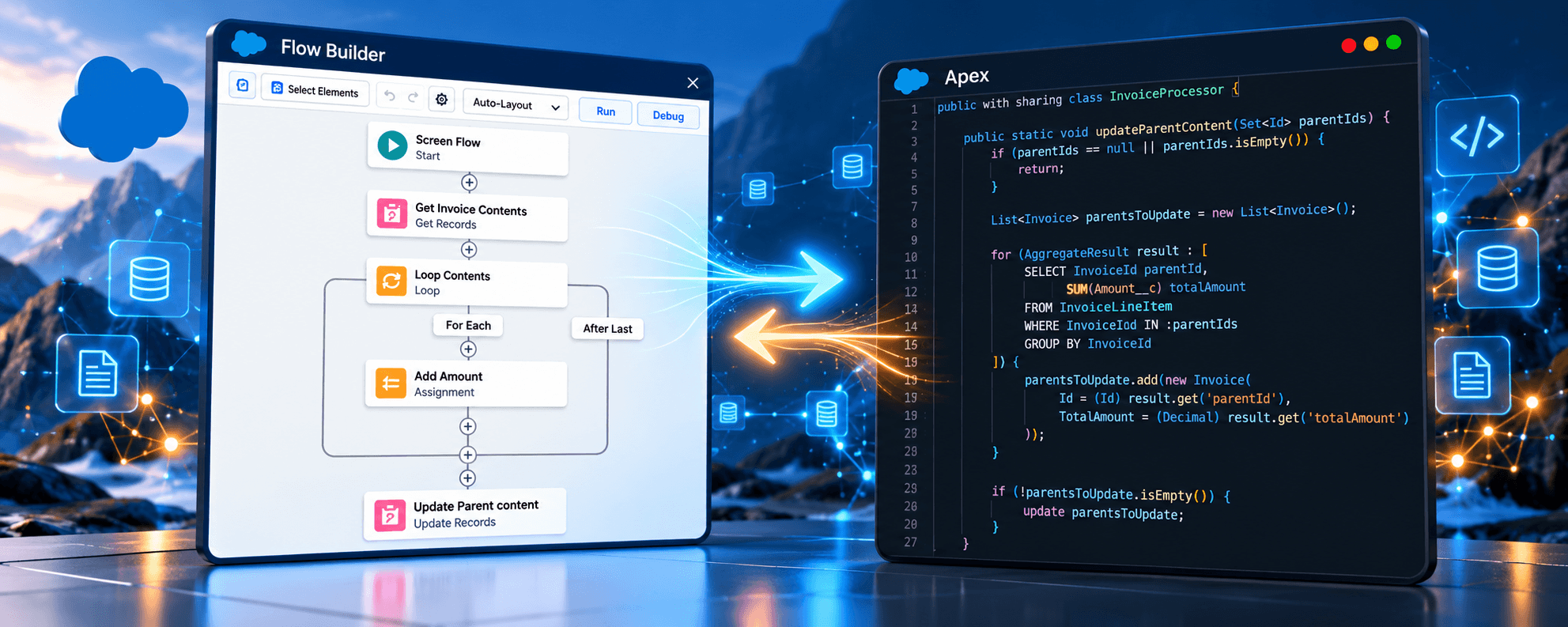
Let’s start with flows. Flows have many of the structures you can find in Apex: iterations, queries, actions, conditions, assignments, and so on.
You generally need knowledge about how to build an application and an algorithm. A flow is an algorithm, just like code.
In the background, Flow is an XML representation of this algorithm, while Apex is a programming language that also represents an algorithm. In both cases, the algorithm becomes understandable by the machine executing it.
Is Flow logic straightforward? Not exactly. Flow logic is visually represented.
This visual representation makes people think that Flow is simpler than Apex. In my opinion, that simplicity can be misleading.
You can achieve in Flow many of the same kinds of things that you can achieve in Apex, and you can combine Flow and Apex using invocable actions. They serve the same purpose in many cases and run from similar entry points, including record updates, schedules, and user actions inside Salesforce.
From a complexity point of view, flows can look simpler because they are visual diagrams, while Apex is something you need to know how to read. But Flow should be treated just as carefully as Apex. For an introduction, see our Salesforce Flow Builder overview.
When we say that admin teams are enough to maintain automation, that can be true—but only with an important condition. The people who maintain Flow should know how to build algorithms.
They need a way of thinking that allows them to build step-by-step algorithms, consider error fallbacks, anticipate what can go wrong, and think about what could be required in the future. They also need a way to test this functionality automatically.
For anybody implementing such automations, I would expect systematic thinking and an understanding of how to build algorithms, systems, and applications.
You should be able to think about which inputs are invalid for the algorithm, which outcomes you expect, which errors you can handle, and which errors you cannot handle.
Low code does not remove the requirement for software engineering thinking. AI-generated code does not remove it either.
Flow is perfectly good when automation is simple. If the requirement is, “When my opportunity is Closed Won, send an email notification,” then yes, you can maintain it perfectly well in Flow.
If you want a UI-guided process for your agents, Flow is also perfectly good. If today you want to send a promotional email, create a flow for a campaign, and then disable or change it in three months, Flow is good. This is exactly where Flow is strong.
But if you are looking for something more complex—such as finding all leads where the Company field resembles the Account name you just converted, and then converting those leads—it is a different story.
My personal rule of thumb is that if there are more than around ten items inside a Flow, I already start looking at it more carefully. If the Flow combines iterations and queries, or needs to query, collect, map, group, or analyze records, then in my opinion it is already becoming complex. This is not an official Salesforce best practice. It is simply my personal rule of thumb.
At this point, especially with AI-generated code, it can be far easier to achieve the same thing in Apex. I would avoid putting logic in Flow when I need to map one record value to another, analyze or group records, perform bulk data processing, or deal with transaction-heavy logic.
That is not because Flow cannot do it. It can. But just because you can build something in Flow does not mean Flow is the best way to express the algorithm. You can have a very large Flow that could be replaced with a small amount of Apex.
When I say that super users can fail miserably with Flow, I do not mean that Flow is bad. It is not the tool; it is how you use the tool. The problem is between the keyboard and the chair.
You can find implementations with many active and deactivated flows piled up in the org, unused fields, duplicated fields, duplicated flows, and duplicated logic. The system may still work, but every new bug or issue raises the cost of maintenance in this setup.
Compared with Apex, flows do not have mandatory unit tests. Yes, you can build tests to cover Flow automation logic, but it is not mandatory—and what is not mandatory is often skipped.
The point is not that Flow cannot be tested. The point is that Flow can create the illusion that because it is visual, it is somehow not code and does not need the same discipline.
It should be treated as code. Naming standards, cleanup, source control, testing, peer review, and a deployment process should all be there.
This is different from Apex, where tests are mandatory for production deployment and the required code-coverage threshold must be met. A Flow can be deployed without automated tests. The point is not that Flow cannot be tested; the point is that testing is easier to skip when the platform does not require it.
From a peer-review standpoint, Flow can actually be harder to review than Apex. If I open Apex code in GitHub, even a Java programmer can identify duplication, huge methods, poor architecture, complicated conditions and loops, or unclear responsibilities.
With Flow XML, it is much harder. Even Salesforce programmers cannot properly review a Flow in GitHub just by looking at the XML; they need to open the Flow visually. So although Flow looks simple inside Salesforce, it can be less transparent from a source-control and code-review standpoint.
I am not trying to say that Apex should now be the default way to build all Salesforce automation. I am exploring the idea that Apex has far more advantages than it had, say, six years ago.
Many of the things historically used against Apex—complexity, development cost, and maintenance cost—are not as strong as they were before. The main reason is AI coding tools.
Apex is Java-like and C#-like. Whoever prefers C# will find a lot of resemblance with C#, and whoever prefers Java will find that it looks familiar. This becomes beneficial when we have a programming language that resembles such common languages.
There is a lot of code written in Java, C#, JavaScript, HTML, and many other technologies. Modern large language models are very good with these languages and, in my experience, also very good with Apex and Lightning Web Components.
My suspicion is that this is also one reason LLMs are much worse with Flow metadata: there is not as much training data for Salesforce Flow XML, and it is hard to find many flows in public GitHub repositories. This is my suspicion, not something I can prove.
In my experience, LLMs are significantly better at generating Apex than generating Flow metadata from scratch. With Flow, I have seen failures where the model simplifies the task, creates many invocable actions, and leaves the Flow as little more than an entry point. I have also seen generated XML that would not deploy correctly to Salesforce.
Modifying an existing Flow is easier for an LLM than creating something new in an empty org, but even then it can produce errors.
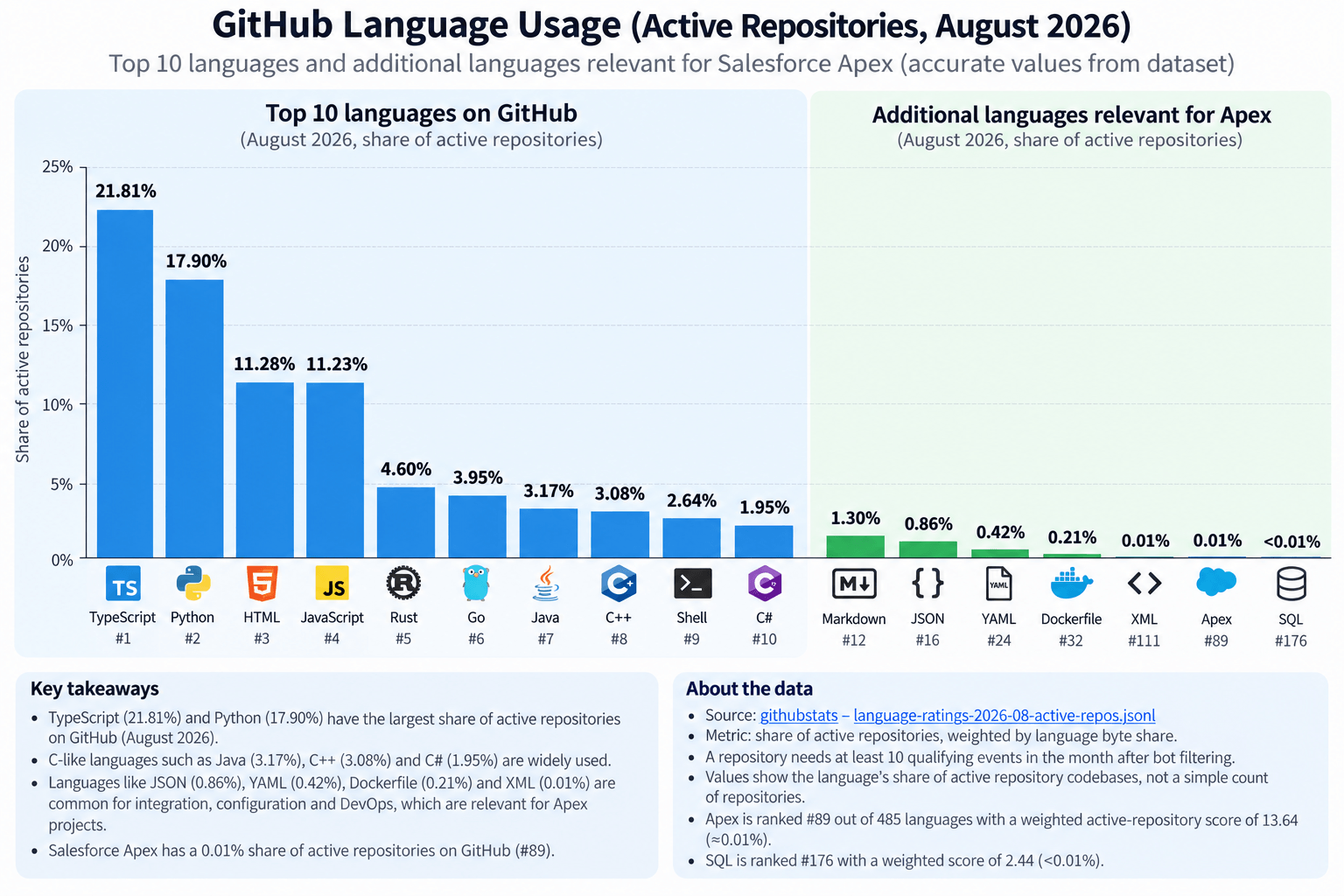
Apex represents a very small share of active public GitHub repositories compared with mainstream languages. This helps illustrate the difference in publicly visible code volume, but it is not evidence by itself that an LLM performs better with Apex or worse with Flow metadata.
With tools like Codex, Claude Code, or OpenCode, developers can now connect an LLM directly to a development project or Salesforce codebase.
The LLM can find specific parts of the codebase, identify issues and bugs, trace logic, and generate changes significantly faster than a developer could do manually. Code generation itself is also very fast, which means developers can build and iterate much more quickly.
But this does not remove the need for engineering knowledge.
Developers who understand how Salesforce should be designed can guide the LLM toward the right architectural decisions, implementation approaches, and coding patterns. As a result, they can produce clean, working code without spending the same amount of time writing everything themselves.
Work that could previously take a month can now sometimes be completed within several days.
The difference is not only speed.
Developers can spend more time on the things that actually matter: core logic, architecture, edge cases, user experience, and maintainability. They can add UI improvements, cover more scenarios with tests, and make additional refinements instead of cutting them because too many development hours would be required to fit within the budget.
The LLM makes implementation much faster, but the quality still depends on the developer guiding it. Developers still need to understand what the correct Salesforce architecture should look like, which patterns to use, and what trade-offs they are making.
I do not really write the code myself anymore, but I also do not simply accept what an AI agent generates. I take full responsibility for what it generates.
My review is not only line by line. I define the architecture first: what it should be, which framework it should use, and which approach it should follow. Then I review generated code for architectural failures, overcomplication, duplication, scaling problems, and things that simply do not make sense.
The important thing is not to review every line manually. The important thing is to understand which architecture you expect before implementation starts.
For example, if I have a roll-up calculation that summarizes the total hours spent on a project or issue, perhaps grouped by person, I need to think about recursion. If I place it inside field-update logic, the roll-up can trigger recursive updates. This can lead to nasty SOQL 101 or CPU-limit exceptions inside Salesforce.
An AI agent might generate something that works on ten records. That does not mean it will work properly at large data volume. But as a person who understands what should be done, I can guide the AI agent.
We can use trigger frameworks and pass flags. In some cases, when we calculate roll-up summaries, we do not need to rerun triggers. In this way, we can build a maintainable infrastructure. This is where engineering knowledge still matters.
Once the structure is set, iterative updates become much easier. Bug fixes, new features, and refactoring become easier, and in many cases work can be delegated to a consultant or an admin.
With a combination of AI and developer skills, we can achieve significant productivity improvements in Apex and Lightning Web Components (LWC).
With LWC, for example, OpenAI Codex can create impressive applications inside Salesforce. For some projects, I do not want to bring all the work, issues, or worklogs into Salesforce data. I can instead build flexible record-related list views that understand there is no Salesforce data and retrieve the information from an API.
AI is also useful for small UI details, such as placing a spinner inside a button. I know that CSS and HTML are my weak points; I do not enjoy working through UI features and animations. Codex is perfectly capable of handling that work while I focus on what I see and describe what should be changed.
This still does not give us one clear answer about which tool should be the primary automation tool inside Salesforce. My opinion is that Apex can be used to build core logic.
By core logic, I mean logic that forms the backbone of how the organization works and covers major business processes in the Salesforce implementation. It could be actions available to agents, such as invocable actions for flows. It could be integrations written in Apex. It could be data operations.
For example, after converting a lead to an account, I might want to find companies with similar names, identify related contacts, and convert them as well. Or I might want a better way to run scheduled jobs. These are core operations that can support entire business processes.
For integrations, I mean direct API integrations from Salesforce when no connector is available and no other integration tool—such as MuleSoft, Talend, or Jitterbit—is already in place. This kind of logic can live in Apex very well.
I would use Flow more for orchestration and flexible changes: something that changes relatively often, or something you are not sure you will need forever. For example, you may want to send an email when a prospect reaches a stage, run a temporary promotional campaign, or provide a UI-guided process for agents. This is where Flow is really good.
Flow and Apex are also very good together. You can place core logic inside Apex, use before-save and after-save flows to modify or orchestrate behavior, and expose Apex through invocable actions. I do not see this as Flow versus Apex in a strict sense. They can complement each other very well.
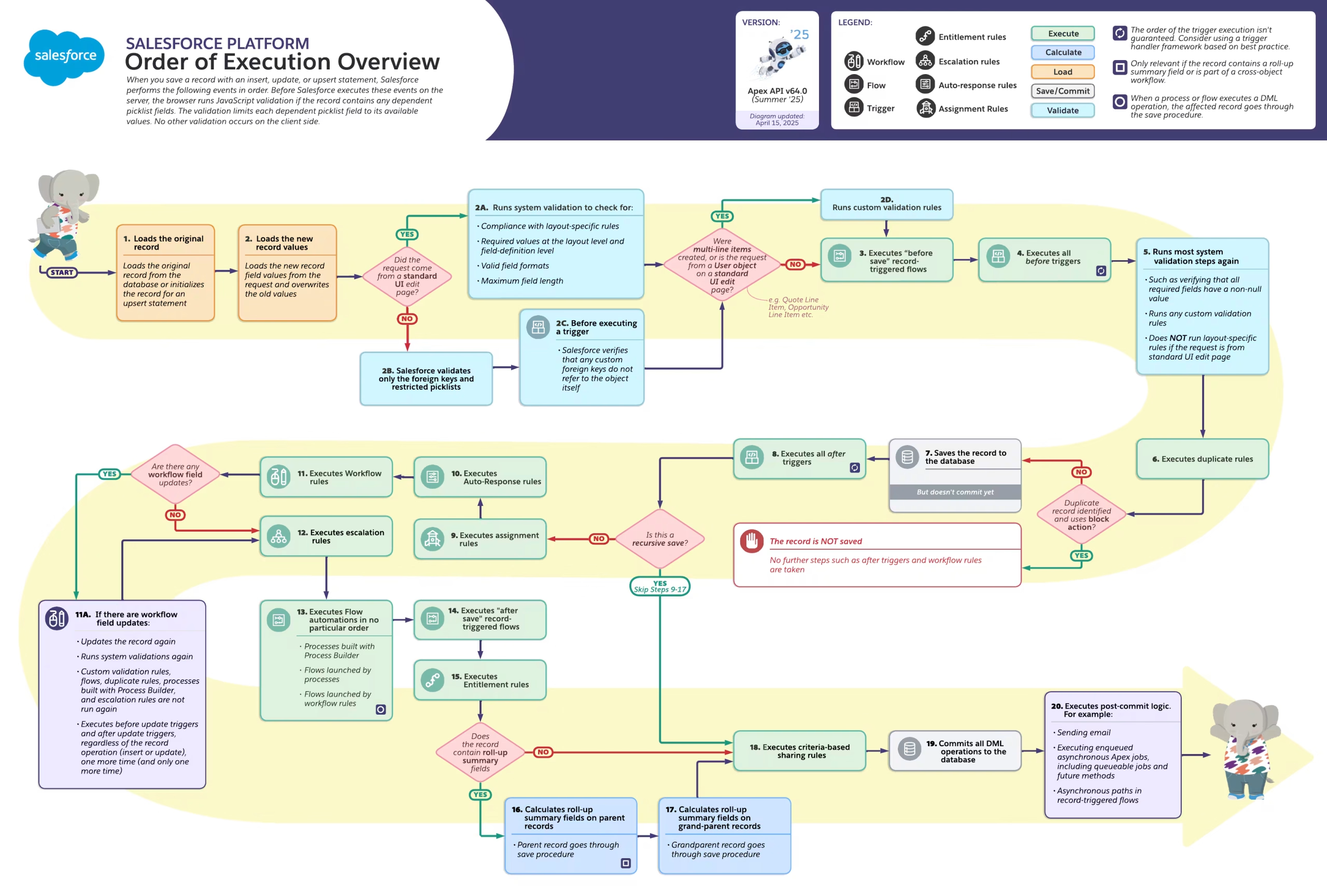
Salesforce’s order of execution shows how flows, triggers, validation, roll-ups, database operations, and post-commit work participate in the same record lifecycle.
Another important topic is change management. This does not apply only to Apex; it applies to the entire Salesforce metadata layer. Flow is also Salesforce metadata. It should be considered code even when it is represented as a visual diagram.
The focus should be on having a safe environment where you can develop, another environment where you can test, and then production. Production is like a holy grail: you observe it and work inside it, but you do not experiment there.
I see many implementations built directly in production. That is a bigger problem than whether somebody used Flow or Apex.
In an ideal world, you can use scratch orgs. If you are doing a greenfield implementation, a scratch org is a good way to start. You can use a managed or unmanaged package for core functionality, deploy it, and run a script to initialize test data. Creating such initialization scripts is also an easy task for LLMs.
Then you have a quality-assurance environment where you can test logic using fictitious, non-production data. This means you do not have to fear sending a fake invoice or an email to real customers about a discount that does not exist.
Once tested, you deploy the same source or package to production. The tooling can differ—scratch orgs, Salesforce sandboxes, packages, or CI/CD. That is secondary. The important point is that development, testing, and production remain separate.
My position is not that everyone should stop using Flow and move to Apex. I do not think Apex should become the default everywhere.
What I am saying is that Apex has far more advantages than it had six years ago. Arguments against Apex—cost, complexity, and maintenance—are weaker now because AI coding tools have changed the economics of development.
At the same time, Flow was never as simple as people made it sound. Flow is still programming. It still requires algorithmic thinking, architecture, testing, change management, and software engineering.
I do not think “use Flow unless you absolutely need Apex” is a good default anymore. I also do not think “use Apex everywhere” is a good answer. Every implementation is a unique scenario.
You need to consider what you are building. Are you a small business or a large business? How much customization do you need? How stable is the logic? Who will maintain it? How much engineering capability do you have? How often will the logic change? What kind of data volume do you have? Then you decide.
For me personally, stable, reusable core logic goes more toward Apex. Orchestration, UI-guided processes, notifications, and flexible changes go more toward Flow.
When Flow starts to become a large algorithm with loops, queries, grouping, mappings, and complicated logic, I would at least stop and reconsider whether it should still be a Flow.
This is not a universal rule. It is a discussion—and today that discussion is much more interesting than simply saying Flow is easy and Apex is hard.
Area | Flow | Apex | My take / myth-busting |
|---|---|---|---|
Simplicity | Visual and approachable | Requires reading code | Flow looks simpler because it is visual, but the underlying logic can be just as complex. |
Best fit | Orchestration, guided UI, notifications, frequently changing logic | Stable core logic, integrations, data processing, reusable services | Consider Apex together with Flow from the beginning, not only after declarative options are exhausted. |
Maintainability | Good while flows stay small and clear | Good when architecture and structure are clear | Maintainability depends more on engineering discipline than on visual versus code. |
Engineering skills | Low barrier to start | Higher initial barrier | Low code does not remove the need for systematic engineering thinking. |
Testing | Tests exist, but are easier to skip | Unit testing is built into normal Apex development | Flow should be treated like code, with tests that catch failures before deployment. |
Complex processing | Queries, loops, mappings, and grouping can become difficult to manage | Usually easier to express directly | Just because Flow can do something does not mean it is the best way to express the algorithm. |
Code review | Easy to understand visually, harder to review as XML | Straightforward to review in source control | A Flow can become harder to review than Apex once you move into Git and normal development processes. |
AI development | LLMs are less reliable with Flow metadata in my experience | LLMs are very strong with Apex in my experience | AI has reduced much of Apex’s historical development and maintenance disadvantage. |
Governance | Can become messy with duplicated and inactive automation | Can become messy with bad architecture | The problem is not the tool. It is how you use it. |
Together | Strong orchestration layer | Strong reusable core | Flow and Apex can complement each other rather than being treated as strict alternatives. |
A practitioner’s summary of where Flow and Apex fit in modern Salesforce implementation.