 Suomi
Suomi Français
 Deutsch
 Polski
Want a Second Opinion Before You Build?
Routine Automation can review the current process, run a Salesforce strategy workshop, and talk through the technical work before you commit to a larger project.



Salesforce has spent years being the CRM small businesses assume they’ll graduate into later, once the team gets bigger and someone has time to manage the setup.
That makes Salesforce for small business sound like a slightly odd pairing, although Salesforce’s current range of suite options makes the platform far more approachable than it used to be.
A Salesforce CRM for small business can work extremely well when the company already has messy handoffs, a real pipeline, or several systems holding pieces of the customer story.
This guide looks at where Salesforce for small businesses earns its keep, what the different editions actually give you, what ownership really costs, and how much work sits between signing up and having a CRM people will use.
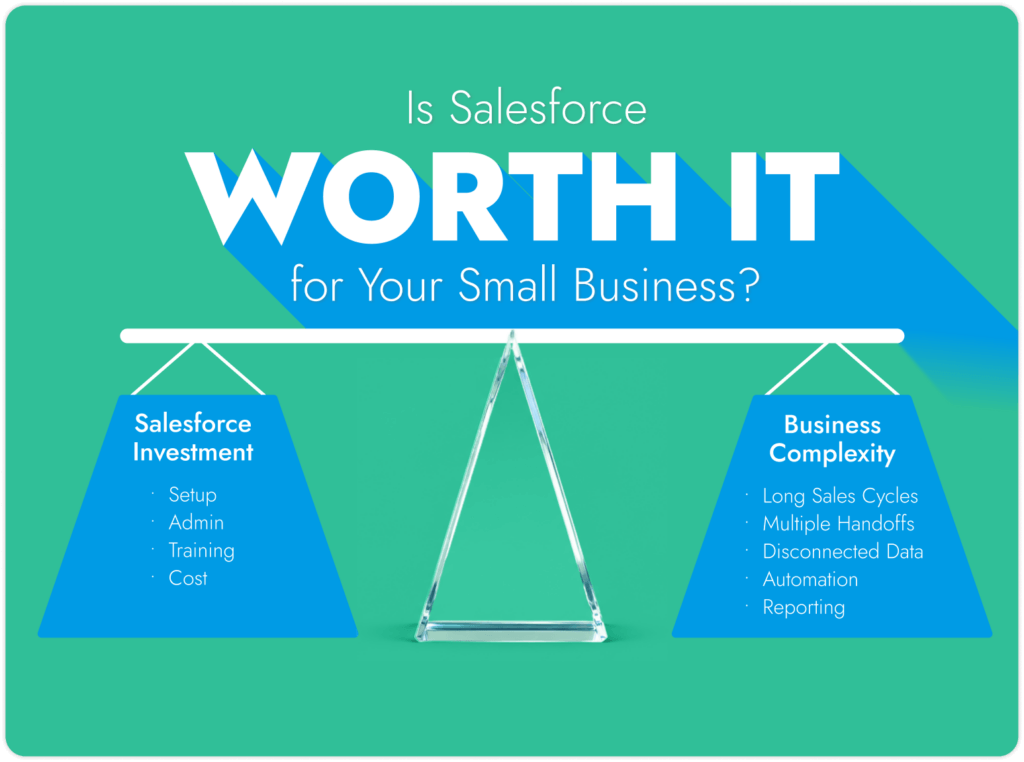
Yes, but company size is only part of the answer. Whether a Salesforce small business setup pays off has less to do with the number of employees you have, and more to do with how complicated your sales process has become, where you expect the company to go next, and whether you’re willing to put some thought into the setup.
A Salesforce implementation for small business makes a lot more sense once the sales process gets a little unruly. Leads are moving between reps, deals have several checkpoints, managers are stitching forecasts together from patchy records, and customer details are spread across half the software stack. B2B firms with longer deals and service companies with years of account history tend to hit that point sooner.
The current product range helps. Salesforce’s small-business pricing page now starts with a two-user Free Suite, while Starter adds lead routing and built-in sales flows. Pro goes further with quoting, forecasting, greater customization, and marketplace access.
The benefits of Salesforce for small businesses get less impressive if you have a straightforward customer list and little appetite for CRM admin. Plenty of lighter tools will do that job with less fuss.
There’s some real-world friction here too. Capterra currently gives Salesforce Sales Cloud 4.4/5 from 18,796 reviews, while recent reviewers still mention the time and technical care involved once the setup gets more complicated. That’s roughly where most people land on Salesforce for SMB use: great when there’s a real process for it to manage, excessive when you’re buying capability because you think you’ll need it someday.
Not Sure Salesforce is the One?
Don’t buy Salesforce on reputation alone. See what you’d get from CRMs that are cheaper, easier to pick up, or a better fit for the way your team works.
Salesforce for small business owners starts looking useful when the current CRM can’t keep up with how the company actually sells. Headcount won’t tell you much. A 12-person B2B firm working six-month deals can have a much messier CRM job than a 50-person company selling something people buy in one call.
A few signs are more useful:

The sales team is getting bigger. With two reps, it’s easy enough to ask who’s working a lead. Add a few more people and that falls apart. Leads get picked up twice, follow-ups go missing, and pipeline meetings turn into detective work.
Deals take a while to close. This is a strong use case for Salesforce for small companies. A B2B opportunity might involve an initial enquiry, three or four contacts, a demo, pricing changes, legal review and procurement before anyone signs. Keeping that history in inboxes gets old very quickly.
Customers stick around after the sale. Service businesses need to remember what happened months ago. Sales promises something, support deals with an issue, finance chases an invoice, then the account comes up for renewal. The CRM becomes far more useful when those conversations aren’t living in separate places.
The business has accumulated too many tools. One system has leads. Another has invoices. Support has its own records. Marketing is working from another list entirely. Combine Salesforce integration services with a suite of tools, and you have less chaos.
People are repeating the same admin every week. Lead assignment, follow-up tasks, approval requests and post-sale handoffs are good automation candidates. A small business Salesforce project is much easier to defend when there’s already a pile of manual work everyone would happily stop doing.
There’s one caution with the Salesforce SMB argument. Buying Salesforce because the company might be much bigger in three years is thin justification. It makes more sense when the current process is already showing cracks and there’s a clear idea of what will get harder next.
For most small firms, Salesforce is really a bet on future process complexity. The investment pays off when the business eventually needs the extra structure, automation and control it bought into.
Fix the Mess Before It Spreads
Work out which CRM problems are already costing time, then decide what Salesforce should handle now and what can stay off the project list.
A small team doesn’t need nine extra dashboards and another place to type customer notes. The benefits of using Salesforce for small businesses show up when the CRM takes something that’s already annoying, slow, or unreliable and makes it easier to manage.
1. Everyone works from the same customer history. Sales doesn’t have to ask support what happened last week, and support doesn’t have to dig through someone else’s inbox. Salesforce can hold the account story while systems such as finance or ecommerce keep ownership of the data they’re best placed to manage.
2. Pipeline meetings get less vague. Managers can see who owns a deal, when it last moved, what’s supposed to happen next, and which opportunities have been sitting around far too long. That’s much more useful than a rep saying, “I think this one’s close.”
3. Some of the boring admin can be handed off. Lead assignment, reminder tasks, follow-ups, and post-sale handovers are obvious candidates. Salesforce’s 2026 State of Sales surveyed 4,050 sales professionals and found sellers spent only 40% of an average week actually selling. It wasn’t an SMB-only survey, but the admin problem is pretty recognizable.
4. Reports can answer real sales questions. Which lead source produces good opportunities? Where are deals dying? Is one stage becoming a parking lot? Forecasting only matters once the underlying pipeline data is believable, of course.
5. Salesforce can sit alongside the tools a business already uses. Email, calendars, Slack, accounting software, ecommerce platforms, and other systems don’t all need replacing. The awkward bit is working out what should sync, which system wins when records disagree, and who fixes it when the connection breaks.
6. The CRM has more room to change with the company. One of the bigger benefits of Salesforce for small businesses is that a fairly standard setup can become more specific later. That saves a growing team from shopping for another CRM the minute its sales process gets a little strange.
7. AI is creeping into the smaller editions too. Free Suite includes AI-assisted summaries and drafting, while Starter and Pro add broader Agentforce capabilities. Salesforce’s latest SMB Trends research covered more than 3,350 SMB leaders and found around three in four were already investing in AI.
Most small teams could ignore a huge chunk of Salesforce and never miss it. The Salesforce CRM for small businesses features worth caring about are the ones that fix familiar headaches: leads nobody followed up, pipeline numbers that feel suspicious, repetitive updates, and customer details buried somewhere nobody can remember.
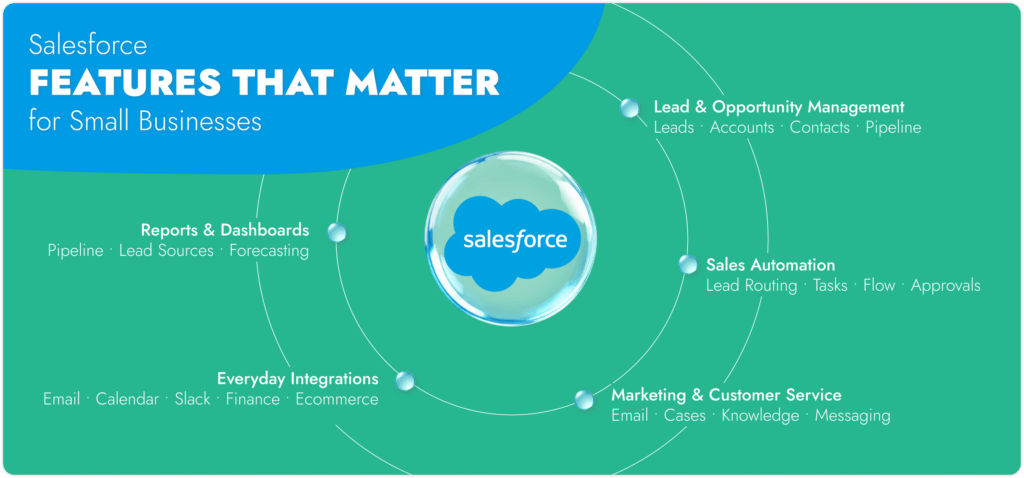
This is the everyday CRM stuff. Leads give new prospects somewhere to land. Accounts and Contacts keep the company and people connected. Opportunities show what might actually turn into revenue.
Salesforce includes Account, Contact, Lead, and Opportunity Management in Free, Starter, and Pro. So a two-person company can run a genuine pipeline on Free without immediately paying for a higher edition.
The need for more usually creeps in once the sales team gets busier. Lead routing matters when enquiries arrive faster than someone can manually divide them up. Foundations also gained People Scoring in Summer ’26, which ranks Leads and Contacts using fit and engagement signals.
A decent automation should remove something people are already tired of doing.
Maybe a website lead needs to go straight to the right rep. Maybe moving a deal into proposal should create a task for Friday. Maybe an opportunity that hasn’t moved in 20 days needs someone to notice. These aren’t glamorous jobs. They’re exactly the sort that get forgotten on a busy afternoon.
Free, Starter, and Pro all include some Flow automation. Pro starts to make more sense when those workflows depend on custom records, approvals, or testing before changes reach the live system. Its sandbox is particularly useful once a Flow mistake could affect more than a couple of records.
Salesforce gives Free users customizable reports and dashboards, which is more generous than some older comparisons suggest.
For a Salesforce small business CRM team, four useful reports will beat 25 impressive-looking ones. Start with questions people already ask: Which deals haven’t moved? Where are leads coming from? Which stage keeps swallowing opportunities? Who has pipeline and who has a very optimistic spreadsheet?
Forecast Management sits in Pro, along with quote creation and management. Those features become relevant when forecasting has consequences beyond a founder wanting a quick sense of the month.
The smaller Salesforce Suites now do more here than the old “Salesforce Essentials” articles would have you believe.
Salesforce for small business customer service and marketing teams now includes case management, knowledge, email support, email templates, and marketing email tools appear across Free, Starter, and Pro. Spring ’26 added Email Builder Lite in all Salesforce suites and made it easier to create marketing audiences from Lead and Contact list views.
The allowances deserve a proper look before anyone cancels their existing email platform. Salesforce currently lists 100 marketing email sends per month for Free and 2,000 for Starter and Pro. A company with 8,000 subscribers will hit that reality rather quickly.
Customer service follows the same pattern. Basic cases are available early. Pro adds features such as Omni-Channel Routing, macros, and in-app or web messaging once support has enough volume to need more structure.
Email and calendar connections are likely to matter before anyone needs help from a Salesforce consulting partner. Free includes basic email/calendar integration, while Starter and Pro use Einstein Activity Capture. Slack Channels in Salesforce are also available across all three Suites.
Then come the awkward connections. QuickBooks has the invoice. Shopify has the order. A support tool has the complaint. An old internal database has one field everybody still relies on for reasons nobody can quite remember.
A connector may move the data, but somebody still has to decide which system wins when values conflict, which fields should move at all, and who gets told when the sync fails. That’s the point where companies might turn Salesforce experts like Routine Automation for extra help.
The awkward part of Salesforce small business pricing is that there isn’t one neat figure. The edition matters, then the product, user count, contract, and whatever extras find their way onto the bill.
As of summer–autumn 2026, Salesforce lists three main CRM suites aimed at smaller businesses:
Free Suite — $0. It includes two user licences and covers the basics: lead, opportunity, and customer case management, assistive AI, email campaigns, forms and analytics, and connected Slack conversations.
Starter Suite — from $25 per user/month. This adds built-in sales flows and lead routing, email nurture campaigns and lead scoring, secure payment links, and an ecommerce storefront. Salesforce allows monthly or annual billing, and transaction fees may apply.
Pro Suite — from $100 per user/month. Designed for businesses that need more advanced CRM capabilities, it adds greater customization and automation, sales quoting and forecasting, real-time chat, and access to AppExchange. It is billed annually, requires a contract, and transaction fees may apply.
These are Salesforce’s published US prices as of summer–autumn 2026, so it’s still worth checking the official pricing page before budgeting, particularly if you’re reading this article later.
The budget also needs room for the work around the licences:
Cost component | Typical consideration |
User licenses | Depends on edition and number of users |
Implementation | Usually a one-time setup project |
Customization | Rises with business-specific processes |
Integrations | Connectors, mapping, or custom work may add cost |
Training | Easy to forget when budgeting |
A Salesforce CRM implementation partner does add upfront cost. What you’re buying is fewer expensive surprises later, from badly mapped data and unnecessary custom work to automations that need rebuilding after launch.
There really isn’t one Salesforce cost for small business you can benchmark. The bill depends on the licenses you choose and how much work sits between buying them and having a CRM the team can rely on.
For some context, Salesforce’s published US pricing as of summer–autumn 2026 starts at $0 for Free Suite, $25 per user/month for Starter Suite, and $100 per user/month for Pro Suite. Businesses that outgrow these small-business packages can move into more specialised Salesforce products. For example, Sales Cloud Enterprise and Service Cloud Enterprise are currently $175 per user/month, billed annually, while Marketing Cloud Next Growth Edition starts at $1,500 per organisation/month, also billed annually.
That makes the potential range fairly wide. A two-person company can start with Salesforce at no licence cost, while a growing business using several products, integrations, and advanced features can easily have a much larger software bill before implementation is considered.
Two companies can buy the same Salesforce edition and spend very different amounts. One might import a clean spreadsheet, use standard opportunity stages, connect email, and be ready fairly quickly. Another may need an old CRM migrated, duplicate records cleaned up, QuickBooks connected, custom approval rules built, and three teams trained before launch.
That second company is paying for much more than software. Its Salesforce for small business cost also includes setup, data work, customization, integrations, training, and whoever looks after Salesforce once the initial project is finished.
This is where a properly scoped strategy from a Salesforce consulting partner can really help. It should establish what genuinely needs to be ready at launch, what can wait, and which bits of the existing process aren’t worth rebuilding in Salesforce at all.
Most Salesforce headaches start before anyone clicks “Go Live.” A rushed setup, muddy ownership, or dirty source data can make even a fairly modest CRM project feel much harder than it needed to.
Challenge | What goes wrong | How to avoid it |
Implementation complexity | Teams start configuring fields and workflows before agreeing how sales actually works | Map the process, owners, and handoffs first |
Over-customization | Every exception becomes another field, Flow, or custom record | Keep the first version close to standard Salesforce and add complexity only when there’s a clear reason |
Poor adoption | Reps keep notes in spreadsheets or inboxes, so Salesforce never has the full story | Remove pointless data entry and train people around the jobs they do every day |
Poor data quality | Duplicates, missing fields, and inconsistent company names wreck reports before the CRM gets a fair chance | Clean and test the data before migration |
Weak planning | The project starts with “we need Salesforce” instead of a measurable problem | Pick a few outcomes the first release has to improve |
Unclear ownership | Nobody knows who manages permissions, reports, fields, or changes after launch | Give one person clear responsibility for the CRM |
Copying old processes | Bad spreadsheet habits get rebuilt inside Salesforce | Question old steps before recreating them |
Choosing the wrong edition | A team buys Starter, then discovers it needs custom objects or deeper connectivity | Check the data model, automation, and integration requirements before signing |
The data problem deserves extra attention because it’s one of the easiest to underestimate. A company can have only 800 contacts and still face a nasty migration if those records come from four spreadsheets with different naming rules and no reliable IDs. A careful Salesforce data migration plan should decide what moves, what gets cleaned, and what can be left behind.
That’s also why “Is Salesforce easy to set up for small business?” is a slightly misleading question. Signing up is easy. Turning Salesforce into something people trust every Monday morning takes a bit more thought.
Salesforce can be a brilliant fit for a 15-person company and a terrible fit for one with 80 staff. Size doesn’t settle much. The better clue is how tangled the sales process has become, and whether the CRM needs to cope with that tangle or simply keep everyone’s contacts and deals in order.
CRM | Usually suits | What to watch |
Salesforce | B2B and service teams with longer deals, custom workflows, heavier reporting, or several systems feeding customer data | Setup can snowball if every request turns into another customization |
Teams that want sales and marketing in one place and don’t want a long setup | More advanced needs can push the price up | |
Companies already living in Microsoft 365, Teams, Power BI, and Power Platform | Can take more setup than a small team expects | |
Businesses where finance, inventory, ERP, and customer records all need to connect | Far too much if the sales team only needs a basic CRM | |
Companies where service operations and case workflows are the bigger headache | Sales CRM isn’t its natural starting point | |
Ecommerce companies that live around products, orders, and repeat purchases | A poor match for long B2B deals with several decision-makers |
A lot of Salesforce alternatives for small business articles make the platforms sound interchangeable. They aren’t. HubSpot is much easier to imagine in a five-person marketing-led startup. NetSuite belongs in a different conversation if finance and inventory run the show. Shopify can happily remain the center of an ecommerce business until account management starts getting complicated.
Salesforce earns its place when the business keeps running into limits. Maybe a deal needs six people attached to it. Maybe sales and service keep losing context between systems. Maybe the reporting has reached the point where someone spends Friday afternoon fixing CSVs again. Those are real reasons to move up to a more configurable CRM.
Compare Before You Migrate
See where Salesforce earns the extra setup, and where a lighter CRM may save your team time, money, and admin.
Salesforce for small businesses is easiest to set up with the right help, and a small set of first steps. Resist the urge to recreate every spreadsheet, report, and exception on day one. Get the important work running properly first.
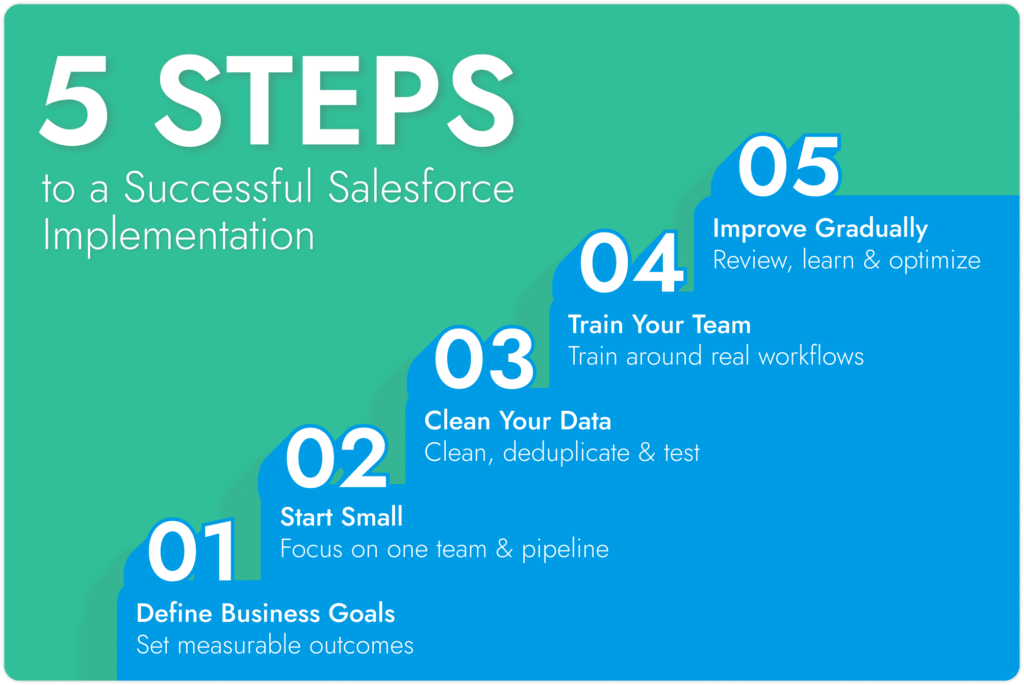

Start with the problem, preferably one you can actually measure.
“Set up Salesforce” isn’t much of a goal. “Every inbound lead gets an owner within 10 minutes” is. So is “sales can hand a closed deal to service without copying customer details into another system.”
Write the process down before anyone starts creating fields or Flows. Salesforce should follow the way the business needs to work, with a few bad habits removed along the way.
Pick one team, one pipeline, and the handful of jobs causing the most grief.
Standard Salesforce objects will cover plenty of early requirements. Custom records, elaborate approval paths, and clever automations can wait until there’s evidence they’re needed. A smaller first release is also much easier to test when something behaves strangely.
Messy data poisons a CRM surprisingly quickly.
Before importing anything, get the Salesforce data migration best practices right. Remove duplicates, sort out inconsistent company names, decide who owns each record, and work out which old fields are still useful. Some historical data simply isn’t worth dragging into the new system.
Test a small batch before moving everything. Finding a broken field map after 50 records is mildly annoying. Finding it after 50,000 is a different afternoon entirely.
A generic Salesforce tour rarely sticks.
A rep needs to know how to qualify a lead and move an opportunity. A manager needs to spot stalled pipeline. A service user needs the customer history before picking up a case.
Then test with normal user permissions. Admin accounts hide an impressive number of problems.
Let the first setup survive a few real weeks before adding more. After 30 days, check which fields stay blank, which reports nobody bothers with, what work still happens somewhere else, and which automations people dodge. Fix one of those things next. Real annoyances make a much better roadmap than the wish list everyone wrote before launch.
Sometimes. If two people need standard records, a basic pipeline, and clean data, there’s a decent chance the team can set it up themselves.
Outside help starts making more sense when the project includes an old CRM migration, several data sources, custom workflows, integrations, unusual permissions, or a team with nobody available to own the setup properly.
DIY may work fine when… | Partner help is useful when… |
Data is already clean | Records come from several systems |
The sales process is standard | Workflows have lots of exceptions |
Few integrations are needed | Finance, ecommerce, ERP, or other tools need connecting |
Reporting needs are simple | Forecasting or reporting needs careful design |
Someone internally can own Salesforce | Nobody has the time or experience to maintain it |
Salesforce consulting partners for US small firms should also be willing to tell you what doesn’t need building. That matters for smaller companies. Paying someone to turn every unusual request into another customization is a quick route to an expensive CRM nobody wants to touch.
Find a Partner That Fits the Job
Compare Salesforce consultants by project fit, delivery style, and the kind of work they actually handle.
Small Salesforce projects have a habit of collecting extras. One more field. One more Flow. One more request from finance that somehow turns into three objects and a new approval path.
Routine Automation can help keep that under control. The first job is working out what the business is actually trying to fix, then building around that rather than around a long Salesforce wish list.
That can mean:

Business discovery: follow a lead from first enquiry through to sale and find the bits where people copy data, chase colleagues, or lose track of ownership.
Implementation planning: work out what needs to be live first and what’s perfectly capable of waiting a few months.
CRM customization: configure fields, objects, permissions, layouts, and reports where the standard setup doesn’t quite fit.
Automation: use Salesforce Flow for jobs people repeat all week, such as assigning leads or creating the next task after a deal changes stage.
Integrations: connect finance, ecommerce, support, marketing, or internal systems when somebody genuinely needs that information inside Salesforce.
Training: show each role the handful of things they need to do well. Reps and managers rarely need the same lesson.
Post-launch fixes: come back to the bits users avoid, misunderstand, or work around once the CRM has survived a few real Mondays.
For a Salesforce small business project, a reliable partner like Routine Automation can be especially useful when somebody needs to push back on scope. Maybe that old spreadsheet column doesn’t need migrating. Maybe a standard object is fine. Maybe the clever automation can wait until the team has proved it actually needs it.
That restraint matters. Every extra moving part has to be understood, tested, and looked after later.
Build What the Team Will Actually Use
Bring the awkward process, the old CRM, or the automation idea that keeps getting postponed. Routine Automation can help turn it into a Salesforce setup the team can live with.
Sometimes the answer is an easy yes. Sometimes Salesforce would be a very elaborate home for a contact list.
The signs are usually sitting in the day-to-day work already. A rep owns a lead but nobody knows it. Sales has one customer record while support has another. The forecast needs an hour of spreadsheet repair before anybody believes it. Somebody has built a workaround that only works because Sarah remembers to update it every Thursday.
Salesforce for small business starts earning its place when those little problems stop being little.
The Free Suite gives very small teams a low-risk way to try the CRM. Starter suits a more settled sales process. Pro becomes more interesting once custom records, forecasting, deeper automation, or more involved workflows enter the picture.
The edition choice still matters less than the rollout itself. Good data, sensible scope, and people who actually use the system will carry a fairly plain Salesforce setup a long way. A heavily customized build with weak adoption will become expensive furniture.
Yes, when the business has something worth organizing beyond a contact list. Is Salesforce good for small business becomes a useful question once leads have owners, deals sit in stages, several people touch the same account, or reporting involves more guesswork than anyone wants to admit. For a two-person firm with 80 clients, it may be overkill.
There’s no single number that tells the whole story. The answer to “How much is Salesforce for small business?” depends on the edition, user count, data cleanup, setup work, integrations, and who maintains it later. Free Suite currently covers up to two users. Paid rates for Starter and Pro are best checked on Salesforce’s current pricing page.
Free is the sensible starting point for one or two people who want a proper CRM without a contract. Starter suits a team that needs routing, sales flows, marketing, and service tools. Pro is where Salesforce gets much more flexible, with custom objects, forecasting, quoting, marketplace access, and a sandbox.
Absolutely, if the job is modest. A clean spreadsheet, standard sales stages, a couple of users, and basic reporting can be handled in-house with Salesforce guidance and Trailhead. The project changes character once old CRM data, several systems, custom automation, or awkward permissions enter the room.
The benefits of Salesforce for small businesses are easiest to spot on an ordinary workday. A rep can see who owns the lead. A manager can trust the pipeline. Support can read what sales promised. Repetitive updates can happen automatically. That’s far more valuable than having another impressive dashboard nobody opens.
Only when the extra freedom earns its keep. A lightweight CRM is often easier to launch and easier to look after. Salesforce starts pulling ahead when the business needs stranger data, longer deal cycles, more serious automation, several system connections, or reporting that has outgrown the basics.