 Suomi
 Français
 Deutsch
 Polski

Contact Routine Automation today!
We'll help you streamline operations by selecting and implementing the best CRM tailored to your unique business needs!



If you’re looking for a powerful CRM for your business, you’ve likely come across HubSpot as a top choice.
Choose a CRM by the work your team needs to do: manage contacts, follow up on deals, connect tools and report on agreed metrics. Separate free tools from capabilities that require a paid subscription or implementation work.
Read our comprehensive guide to explore HubSpot’s features and how it can benefit your business.
HubSpot is a Customer Relationship Management (CRM) software providing different marketing, sales, customer service, and content management tools. Companies use it to get and retain customers.
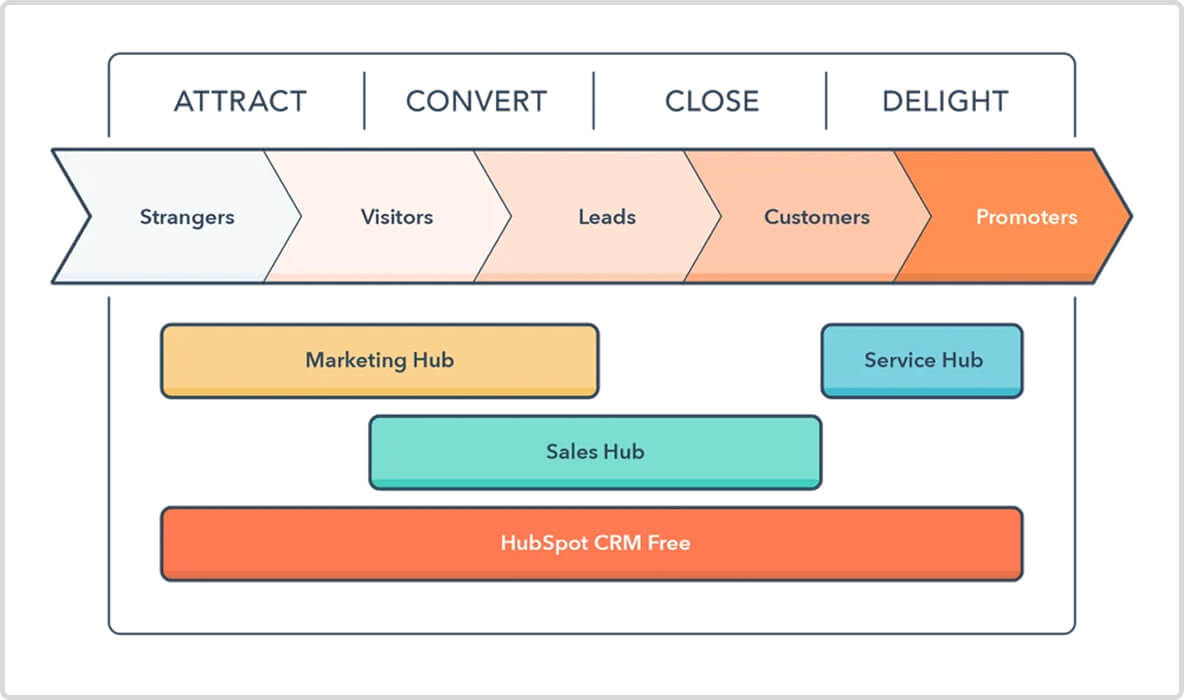
HubSpot groups capabilities into products including Marketing, Sales, Service, Content and Data, with separate revenue and CRM offerings. This overview describes common business jobs; availability and limits depend on product, edition and seats.
Marketing Hub
What’s included in the Marketing Hub:
Lead capture tools with forms, landing pages, and live chat
Marketing automation with email workflows and behavioral tracking
Email marketing with templates, A/B testing, and segmentation
Content management with blog creation, SEO tools, and drag-and-drop editing
Social media management with scheduling, monitoring, and analytics
Analytics and reporting for website traffic, lead conversion, and campaign performance
Maximize HubSpot’s Power with Expert Implementation
Take your HubSpot CRM to the next level by connecting it with powerful marketing automation tools. Our team can help you unlock the full potential of HubSpot Marketing Hub — fast, efficiently, and without hassle.
Data Hub (formerly Operations Hub)
What’s included in the Operations Hub:
Programmable automation for business processes
Scheduled workflow triggers for automated actions
Data health monitoring with duplicate detection and source tracking
Bulk duplicate management with AI-powered merging
Data formatting tools with AI-powered recommendations
Sales Hub
What’s included in the Sales Hub:
Contact and deal management in a centralized database
Sales automation for repetitive tasks
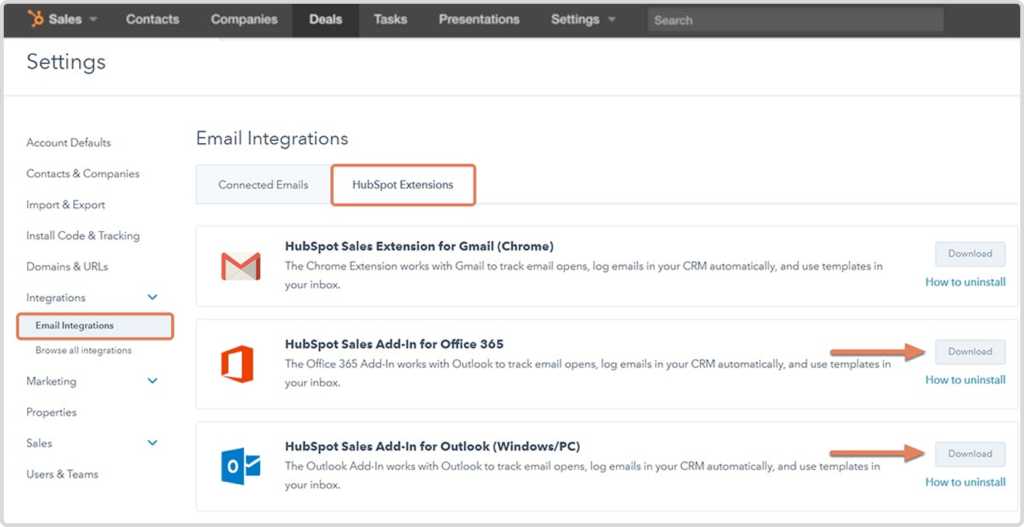
Email tracking with notifications for opens and clicks
Meeting scheduling with integrated calendar tools
Document management with tracking and engagement insights
Pipeline management with custom deal stages and forecasting
Service Hub
What’s included in the Service Hub:
Ticketing system for case tracking and resolution
Knowledge base for self-service customer support
Live chat and chatbot automation for real-time communication
Customer feedback tools with surveys and NPS tracking
Customer satisfaction tracking with insights and reports
Workflow automation for ticket assignments and follow-ups
Deliver Outstanding Support with HubSpot Service Hub
Empower your customer service teams with smarter tools, automated ticketing, and seamless knowledge base integrations. We help you set up and optimize Service Hub to improve satisfaction and retention.
Content Hub (formerly CMS Hub)
What’s included in the CMS Hub:
Drag-and-drop website builder for easy page creation
Customizable themes with pre-built and custom designs
SEO tools with optimization recommendations and tracking
Content staging for testing and previewing changes
Multi-language support for localization
Adaptive testing with AI-driven A/B experiments
Free tools provide a starting point for contact management and selected marketing, sales and service jobs. Their limits differ from paid editions; the free-versus-paid decision should follow the workflow you need.
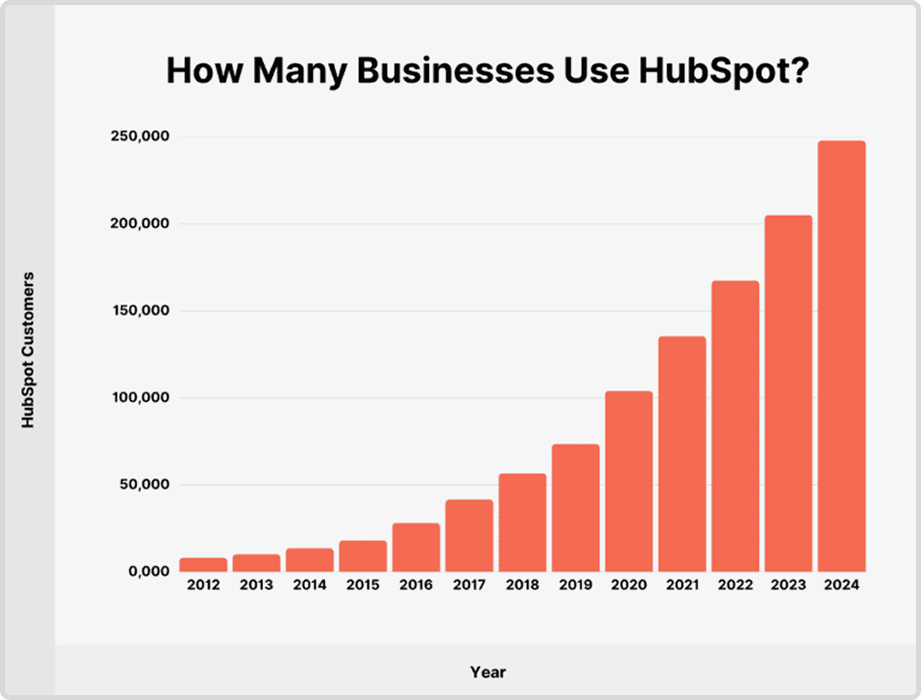
HubSpot offers free CRM tools alongside paid products. Basic contact and deal management does not imply that advanced automation, scoring, forecasting or custom reporting is free. Check each capability against your account before planning a rollout.
Plan and seat check: distinguish free-account users, paid seats and view-only access. View-only permissions are not the same as unrestricted access to a free CRM account.
See HubSpot’s current free and paid tool limits and confirm account-specific terms before buying.
Let’s dive into the core features of HubSpot CRM and explore how they can benefit your business.
Contact and Lead Management
A centralized contact record helps an owner find the context needed for a follow-up. Define required properties, ownership and duplicate-handling rules before importing data.
HubSpot CRM provides a centralized database where businesses can store, track, and manage leads and customers efficiently.
Key benefits

Store up to 1,000 contacts for free
Automatically track interactions across email, social media, and calls
Segment contacts based on custom properties, behavior, and engagement
View the entire history of emails, calls, and meetings in a single timeline
How does this change your day-to-day life?
With HubSpot CRM, you no longer face scuttered customer data. You have quick access to lead interactions across email, social media, and calls. This means less time searching for information and more time building meaningful customer relationships.
Plan check: The advertised free-account contact/user limits are separate from paid seats and product-specific limits. Verify import and contact-tier limits before migration.
Sales Pipeline and Deal Tracking
HubSpot CRM allows companies to visualize, track and manage deals through pipeline stages. It helps with keeping track of sales teams, assisting in quicker closing of deals and maximizing their revenue potential.
Key benefits
Customizable sales pipeline stages to match business needs
Customizable interface for easy deal tracking
Configurable automated follow-ups and reminders for deal progression
How does this change your day-to-day life?
HubSpot CRM helps you close deals faster and better understand what’s going on at different pipeline stages.
Plan check: Basic pipeline tracking and advanced automation/forecasting are different capabilities. Confirm the Sales Hub edition and seats for the workflow you need.
Email Tracking and Automation
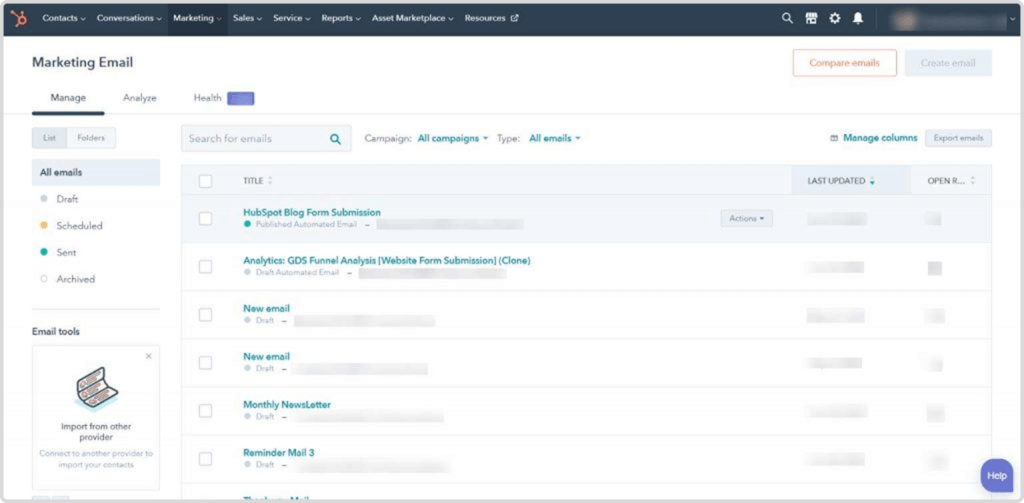
Email tracking can expose permitted engagement signals, while sales sequences and marketing automation serve different purposes. Check subscription, seats and enrollment rules; an open is not proof of buying intent.
Key benefits
Real-time email tracking
Automated email sequences to nurture leads effectively
Personalized email templates to improve engagement
A/B testing for optimizing email performance
How does this change your day-to-day life?
HubSpot CRM can be configured to send automatic notifications when your lead opens an email, clicks a link, or responds. This means you have better engagement and reduced manual workload, as your employees do not need to check everything or constantly guess whether a prospect is interested.
Plan check: Sales sequences, workflow automation and marketing A/B testing have distinct product and paid-tier requirements. Free email tracking does not include every automation feature.
Task and Activity Management
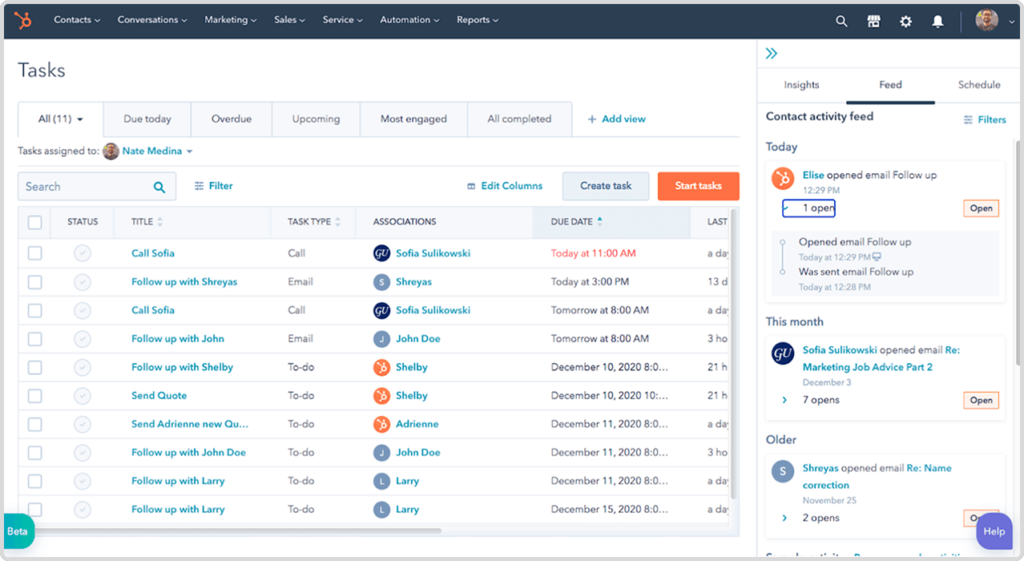
Tasks and activity tracking can make ownership visible. Configure the next action, due date and escalation rule around the team’s process instead of assuming reminders alone resolve missed follow-ups.
Key benefits
Assign and track tasks for sales and customer service teams
Set up automated reminders for calls, meetings, and follow-ups
Integration with calendars (Google, Outlook) for streamlined scheduling
Custom task queues to prioritize daily activities
How does this change your day-to-day life?
You won’t miss anything critical with automatic reminders for calls and meetings. You can easily manage your tasks depending on their importance and urgency. You stay organized and know that high-priority tasks are always addressed first.
Reporting and Analytics
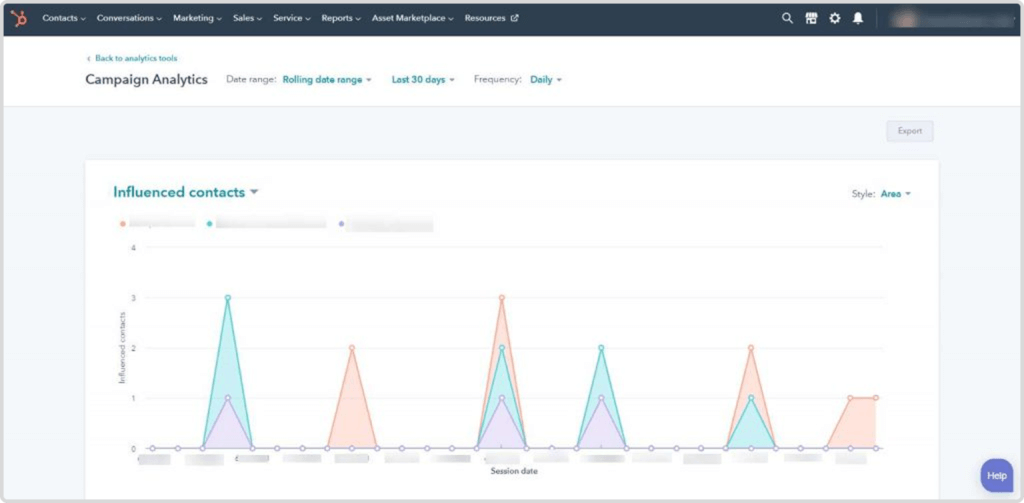
A report is useful when teams agree what its metrics count. Define data source, date basis, associations and exclusions before comparing pipeline or campaign results.
Note! With AI-powered reports in HubSpot, you can generate data-driven reports effortlessly, uncovering key patterns without manual analysis.
When default reporting does not answer your question, explore HubSpot reporting configuration after defining the metrics and source data that need to reconcile.
Key benefits
Sales performance dashboards to track key metrics
Lead conversion reports for evaluating campaign effectiveness
Custom reports on sales, marketing, and service performance
Revenue forecasting to improve business planning
How does this change your day-to-day life?
You don’t need to wait until somebody makes a report (which could possibly contain errors) and track key performance metrics successfully.
Plan check: Custom reporting, forecasting and AI-assisted analysis depend on product, edition, permissions and data. Define the metric and test its source total.
Integration with Other Tools
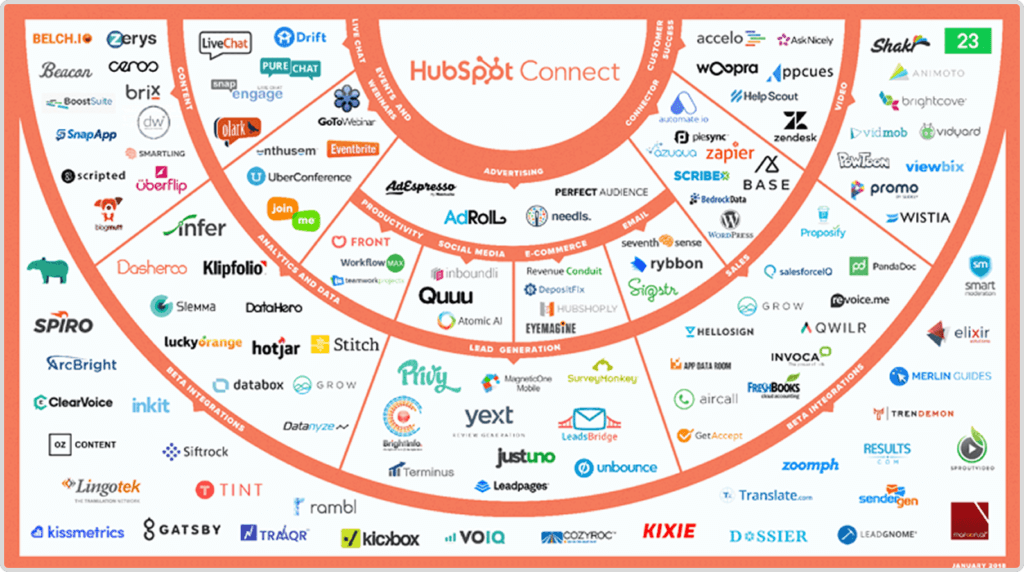
We bet you are tired of juggling all the apps, switching between platforms, and manually transferring data. Without one centralized place, everything becomes a mess.
The good news is that this problem is actually easy to solve. Hubspot implementation is a good way to streamline your processes automatically and ensure you have a single and credible source of truth.
Key benefits
Native integration with Salesforce, allowing smooth data flow
Sync with Slack for internal team collaboration
Zapier automation to connect with other business tools
API access for custom integrations
How does this change your day-to-day life?
There is no longer a need to switch between multiple apps. Everything is organized in one place, and you get timely updates between HubSpot and Salesforce, Slack, or Gmail. This helps to improve collaboration with internal teams.
Plan check: Each connector has eligibility, mapping, access and sync limits. Native Salesforce connectivity requires an eligible paid HubSpot subscription and Salesforce access.
Marketing and Lead Nurturing
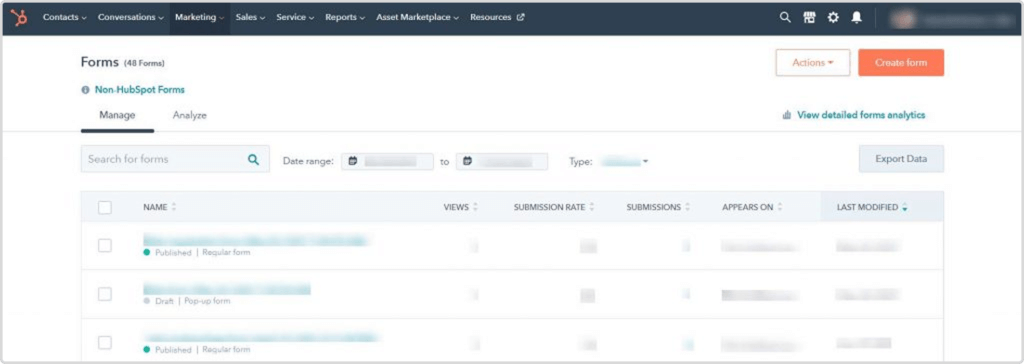
Capturing a contact and nurturing a buying conversation are different jobs. HubSpot’s marketing products can support forms, segmentation and follow-up, but workflow automation, advanced scoring and other capabilities depend on the product and paid edition. Define the audience, consent and stop conditions before choosing the tools.
Key benefits
Lead scoring and segmentation for better targeting
Automated workflows for email sequences and follow-ups
Landing page and form builders to capture leads
Chatbots and live chat for real-time engagement
How does this change your day-to-day life?
HubSpot CRM helps to make better targeting campaigns. Each information you operate is based on customer behavior and engagement. This leads to higher conversion rates.
Plan check: Advanced lead scoring, marketing workflows and sales sequence enrollment are paid/product-specific capabilities. Verify exact enrollment and consent rules.
Customer Service and Relationship Management
Service records can give agents context across channels and help them handle a request consistently. Knowledge base, routing and automation capabilities depend on the selected Service Hub edition and configuration.
Key benefits
Ticketing system for handling customer issues efficiently
Customer feedback tools to measure satisfaction
Knowledge base and self-service options
Automated responses and live chat for real-time support
How does this change your day-to-day life?
Collect customer feedback for improved service. Due to the live chat and automated ticketing, you enjoy faster response times and better visibility into customer interactions.
Plan check: Knowledge base, routing, feedback and service automation have edition-specific requirements. Ticketing availability does not establish access to every service feature.
While you’ve already seen how rich this well-known CRM is with features, it’s high time to know more about the benefits of HubSpot.
As checked on 30 October 2026, HubSpot’s advertised free account allows up to two users and 1,000 contacts. Legacy contracts and other object limits may differ; check your account terms.
Paid products expand capabilities and limits. Budget for the required products, seats and contact tiers, plus migration, configuration, training and ownership; do not assume unlimited users or free advanced automation.
Illustrative configuration example: define one owner for each demo request, agree qualification fields, and map a valid inquiry to a single follow-up task. Test duplicates and missing company data before activating routing. This describes a setup pattern, not a measured customer result.
⚡️ Improved Sales Efficiency
A visual pipeline helps owners see a deal’s stage and next action. Its usefulness depends on consistent stage definitions, complete records and routine review.
⚡️ Enhanced Contact and Lead Management
HubSpot’s lead scoring and segmentation tools help store and organize customer interactions, emails, calls, and deal history in one place.
Hubspot also categorizes leads based on behavior, demographics, and sales stage for targeted marketing. High-value leads are identified based on engagement and readiness to buy.
⚡️ Seamless Email Integration and Tracking
HubSpot seamlessly integrates with Gmail, Outlook, offering advanced email tracking capabilities. Basically, it connects with 1,000+ apps!
⚡️ Data-Driven Decision Making
Predictive scoring requires eligible functionality and suitable historical data. Evaluate its behavior against your own outcome definitions rather than assuming a fixed prediction accuracy.
Businesses can also use AI-powered insights to predict revenue and sales trends in real time, as well as generate comprehensive reports on sales performance, deal progress, and conversion rates.
⚡️ Better Customer Relationship Management
With the help of Hubspot, businesses benefit from 360-degree customer interactions.
Sales, marketing, and support teams can access shared customer data, as the CRM centralizes customer interactions. This helps to improve customer offerings while being sure that every touchpoint is personalized, timely, and data-driven.
⚡️ Marketing and Sales Alignment
Deliver targeted messaging based on user behavior and preferences. Your marketing campaigns will be tailored to user behavior, preferences, and engagement history, and this means that leads receive the right message at the right time, improving conversion rates and customer retention.
Hubspot CRM allows to set up email sequences and workflows to guide leads through the sales funnel. It is also integrated with the HubSpot Marketing Hub, which enables seamless collaboration between sales and marketing teams.
⚡️ Easy Integration with Other Tools
HubSpot integrates with Slack, Shopify, Zoom, and 1,000+ other apps as well as third-party integrations. This helps to keep teams updated instantly without needing to switch platforms.
⚡️ Improved Customer Support and Retention
Ticketing and knowledge management have different availability and limits across Service Hub editions. Verify the plan, access and maintenance process before designing a self-service journey.
What’s more, HubSpot’s Live Chat and AI-powered chatbots enable businesses to engage with customers in real-time, offering immediate assistance without requiring 24/7 human availability.
⚡️ User-Friendly Interface and Quick Adoption
An accessible interface can support adoption, but the team still needs training in its own processes, permissions and data standards. Check actual task completion rather than an unsupported comparative percentage.
⚡️ Cost-Effective and High ROI
Choose the smallest product and integration scope that meets the requirement. Free CRM access does not remove paid-product, administration, migration or integration costs.
At Routine Automation, we specialize in automating business and processes. Our goal, as B2B consultants, is to optimize your operations, boost efficiency, and drive business growth.
Unlike traditional CRM vendors, we don’t sell HubSpot or Salesforce. Instead, we are trying to focus on what are the needs of your business. And only after that, we choose the necessary tool.
Start with the processes and data your team needs, then choose and configure the capabilities that support them.
As you can see, HubSpot is a powerful all-in-one platform. With the help and benefits of HubSpot CRM, you can improve your decisions, efficiency, and profitability.
Contact Routine Automation today and let’s talk about how we can automate your business. We hope we can build a smarter, more efficient future together!