Discuss your Salesforce setup
Review your Salesforce plans with a consultant who focuses on structure, automation, and long-term maintainability.




The NetSuite vs Salesforce question usually comes up at a specific moment. Finance is asking for tighter control. Sales is pushing for cleaner pipelines. Operations wants fewer handoffs. What’s really being debated isn’t software, it’s where the business should be anchored.
NetSuite and Salesforce approach that problem from opposite directions. NetSuite is built around accounting, orders, inventory, and reporting. Salesforce is built around leads, deals, service cases, and customer history. As both platforms expanded, the overlap grew.
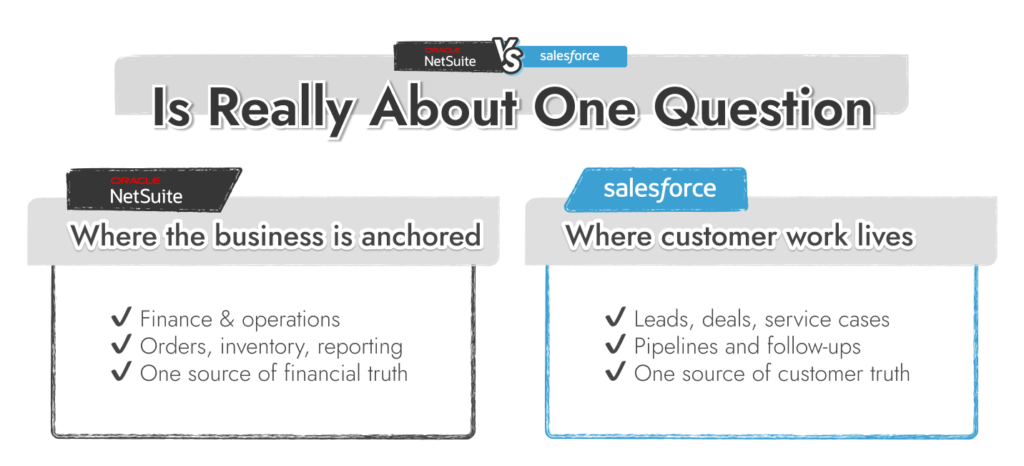
Today, Salesforce continues to lead the global CRM market by share, according to IDC. Oracle, meanwhile, keeps NetSuite at the center of its cloud ERP strategy. But that doesn’t explain how the tools behave once approvals, exceptions, and real-world pressure hit.
This article looks at NetSuite versus Salesforce decisions through day-to-day use. We’ll focus on how teams actually work in each system, why NetSuite CRM reviews often surprise CRM buyers, and when pairing Salesforce and NetSuite is more realistic than forcing one platform to do everything.
It’s easy to get overwhelmed when you’re looking at Salesforce vs other CRM solutions.
The best strategy is usually to focus on what’s causing the most headaches in your business right now.
If it’s finance and ops, NetSuite usually makes instant sense. It’s the place where the work lands: invoices, purchase orders, inventory counts, fulfillment status, month-end close. Customer records matter, but they’re tied back to transactions and operational reality. NetSuite is built to keep the back office coherent as the business grows.
If it’s sales or support teams hitting limits, Salesforce usually wins the room. It’s where leads turn into deals, where cases pile up, where follow-ups get missed when the system isn’t doing enough of the admin for you. Salesforce is still the market leader in CRM share. Other platforms are catching up, but as you’ll often see if you look at HubSpot vs Salesforce lists, Salesforce is hard to beat for flexibility and scale.
|
Category |
NetSuite |
Salesforce |
|---|---|---|
|
Core focus |
ERP (finance + operations first) |
CRM (customer + revenue first) |
|
Built for |
Accounting, orders, inventory, procurement, reporting |
Leads, pipeline, service cases, marketing journeys |
|
«System of record» by default |
Financial truth (billing, fulfillment, inventory) |
Customer truth (activity, pipeline, service history) |
|
Typical buyers |
Finance + ops-led orgs |
Revenue + service-led orgs |
|
CRM depth |
Solid inside an ERP flow; best when tied to transactions |
Deep CRM specialization across sales/service/marketing |
|
Best-fit example |
You need clean lead-to-cash with fulfillment + invoicing in one place |
You need flexible pipelines, service workflows, automation, and fast iteration |
|
Customization tools |
SuiteBuilder, SuiteFlow, SuiteScript, SuiteApps |
Flow, Lightning pages, custom objects, Apex/LWC, AppExchange |
|
Automation “shape” |
Ops workflows (approvals, order flow, finance routines) |
Cross-team workflows (sales → service → ops handoffs) |
|
AI direction (2025–2026) |
Finance/ops productivity (close, analytics, summaries) |
Agent-based workflows + governed rollout (Agentforce direction) |
|
Reporting bias |
Finance/operational reporting |
Pipeline, service, marketing performance |
|
Integrations |
SuiteCloud APIs + connectors; ERP-centered |
AppExchange + APIs + middleware patterns |
|
Implementation reality |
Often bigger because finance/ops dependencies |
Can start small; can get complex fast with customization |
|
Pricing style |
Quote-based, module-dependent |
Published tiers; costs rise with add-ons and scale |
|
Most common «real-world» setup |
ERP as the backbone; CRM supports ERP flow |
CRM as the hub; integrates to ERP for billing/fulfillment |
The confusing thing about NetSuite CRM vs Salesforce conversations is each platform has a different baseline, even if they share overlapping features.
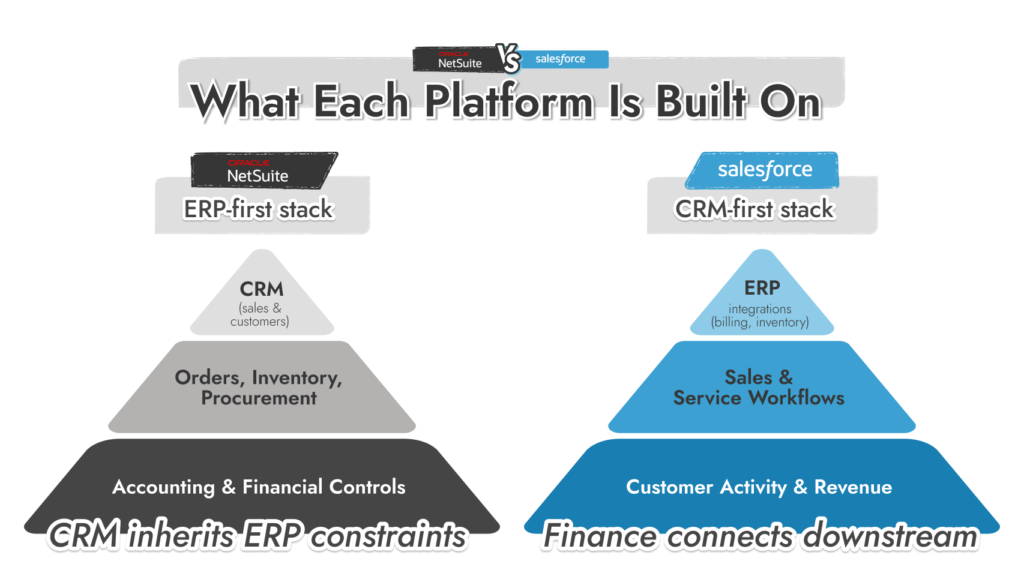
NetSuite is designed to act as the financial and operational system of record. Its data model assumes that accounting accuracy, inventory valuation, and fulfillment status are non-negotiable. CRM data exists inside that structure.
This is why NetSuite CRM vs Salesforce CRM comparisons often surface late in ERP-led projects. The CRM isn’t isolated; it inherits ERP constraints.
Salesforce is designed to manage customer activity and revenue workflows independently of financial systems. Its data model prioritises flexibility and frequent change in sales and service processes.
This is the practical divide behind Salesforce vs NetSuite. NetSuite enforces consistency through structure. Salesforce allows variation and relies on governance to keep order.
If Salesforce is on the table, the biggest risk isn’t features, it’s structure. A clear implementation plan keeps data, automation, and reporting clean as the system grows.
When comparing NetSuite versus Salesforce at the CRM level, the difference is not whether CRM features exist. Both platforms cover the CRM basics, but data and features are structured differently. Most companies figure that out fast whether they’re looking for the best CRM for small business, or the top solution for enterprise teams.
NetSuite CRM
Salesforce CRM
NetSuite CRM
Salesforce CRM
NetSuite CRM
Salesforce CRM
Because of this split, many organizations run Salesforce and NetSuite together rather than using one system to cover both ERP-driven service and CRM-driven service operations.
Customization is where the difference between NetSuite vs Salesforce becomes obvious. Both platforms can be customized. The limits, risks, and effort are not the same.
NetSuite allows customization, but it is designed to protect accounting and operational integrity. Most changes are evaluated in terms of how they affect transactions, reporting, and controls.
Primary customization tools
Practical constraints
NetSuite customization works best when processes are stable and tightly governed. It’s less forgiving when teams want to adjust workflows frequently or experiment with structure.
Salesforce, alternatively, is designed for frequent change. Most customization is isolated to CRM objects and workflows, which reduces downstream impact on finance or operations systems.
Primary customization tools
Practical characteristics
This flexibility is why Salesforce vs NetSuite CRM comparisons often favour Salesforce for fast-moving sales or service teams. It is also why Salesforce environments degrade over time without ownership and standards.
For organizations extending Salesforce through packaged solutions or custom apps, Salesforce AppExchange development services are commonly used to control scope and reduce long-term maintenance risk.
Custom fields and automation add up fast. A structured Salesforce build avoids rework, reporting gaps, and brittle workflows as usage grows.
Automation exists in both NetSuite and Salesforce, but it is applied in different parts of the business and governed by different constraints.
NetSuite automation is primarily transaction-driven. Rules exist to control how financial and operational records move through the system and to reduce manual intervention in processes that affect reporting, compliance, or fulfillment. Most use cases include:
Automation logic in NetSuite is closely tied to record state. A workflow triggers because a transaction meets defined criteria. The outcome is deterministic. Changes to automation often require review across finance, operations, and reporting because downstream effects are common.
This approach aligns with environments where accuracy and repeatability take priority. It also explains why automation changes are treated cautiously in many NetSuite CRM vs Salesforce CRM projects.
Salesforce automation is event-driven and user-centric. Rules exist to coordinate activity between people, teams, and systems rather than to enforce financial controls. Use cases include:
Salesforce Flow is the primary automation mechanism. Flows can be created, modified, or disabled without affecting ERP systems. Automation changes are usually scoped to a specific object or team. This model supports frequent adjustment. It also requires governance. Multiple flows can apply to the same records, and conflicts are possible if ownership is unclear.
AI exists in both platforms, but it’s applied to different problems.
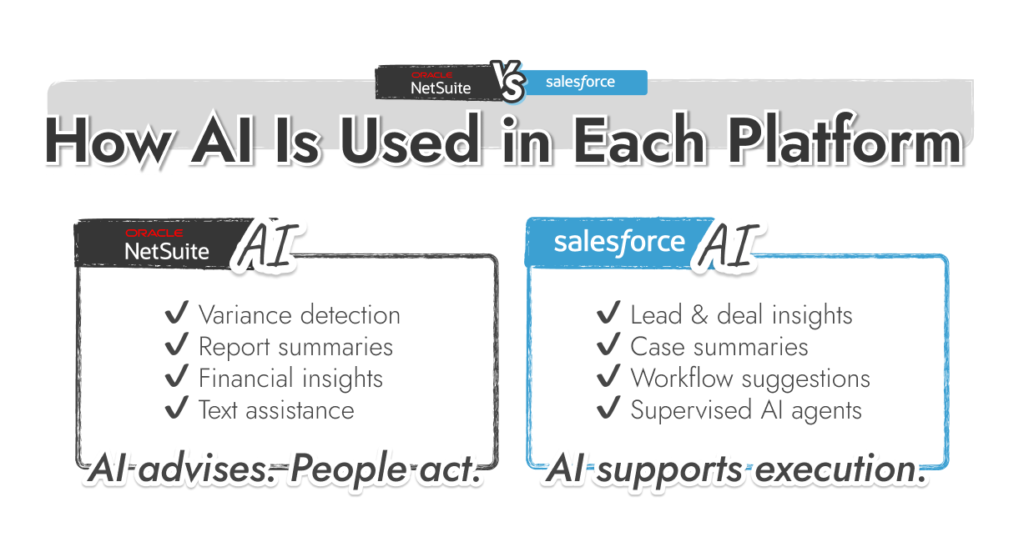
NetSuite applies AI inside controlled, transactional areas. The goal is to reduce manual analysis in finance and operations, not to automate decision-making across teams.
Common NetSuite AI use cases
AI output in NetSuite is usually advisory. It highlights patterns, exceptions, or summaries, but it does not act on records without explicit rules. This fits environments where accuracy, auditability, and traceability matter more than speed. In many NetSuite CRM reviews, AI is described as helpful but deliberately constrained.
This approach reflects NetSuite’s role in NetSuite vs Salesforce CRM decisions: AI supports finance and operations rather than driving customer workflows.
Salesforce applies AI closer to day-to-day customer activity. The emphasis is on assisting sales, service, and support teams and reducing manual coordination.
Common Salesforce AI use cases
Salesforce’s recent direction focuses on supervised AI agents that operate inside CRM workflows. These agents can suggest actions or complete tasks, but they are designed to remain observable and governed. This direction is a major factor in NetSuite vs. Salesforce comparisons where automation and scale are priorities.
Salesforce includes AI features, but results depend on data structure and workflow design. We help teams set those foundations before AI is introduced.
Integration is where Oracle NetSuite vs Salesforce decisions open up. Very few organizations run either platform in isolation. The question is how each system expects to connect with others, and what role it plays once those connections exist.
NetSuite is designed to sit at the center of financial and operational data. Integrations typically exist to feed transactions into NetSuite or push validated data out for downstream use. You’ve got:
Integrations are usually designed around NetSuite’s data model. External systems adapt to it, not the other way around. This reinforces NetSuite’s role as the system of record for billing, inventory, and financial reporting. It also means integration changes often require coordination with finance or operations.
Salesforce is built to sit inside a larger application landscape. Its ecosystem assumes multiple connected tools rather than a single, dominant system. You get:
Salesforce integrations are usually scoped to specific objects or teams. Changes can often be made without affecting finance or fulfillment systems. This makes Salesforce easier to extend and easier to replace at the edges.
Because of this, many Salesforce NetSuite architectures place Salesforce at the front of the business and NetSuite behind it. Salesforce handles customer interaction. NetSuite handles transactions.
In NetSuite vs Salesforce comparisons, scalability usually comes down to what’s growing first: transaction volume or the number of users.
NetSuite scales operational and financial scope.
Growth typically adds structural complexity. New entities, locations, or product lines require configuration and review. Reporting remains consistent because data models are fixed early.
This model fits organizations where growth increases accounting, inventory, or compliance requirements.
Salesforce scales organizational usage.
Growth typically adds users and processes. Data structures remain flexible. Automation and permissions change more frequently than core models.
This model fits organizations where growth affects how teams sell or support customers.
Implementation differences in NetSuite vs. Salesforce rollouts are driven by scope. ERP scope changes finance and operations. CRM scope changes sales and service workflows.
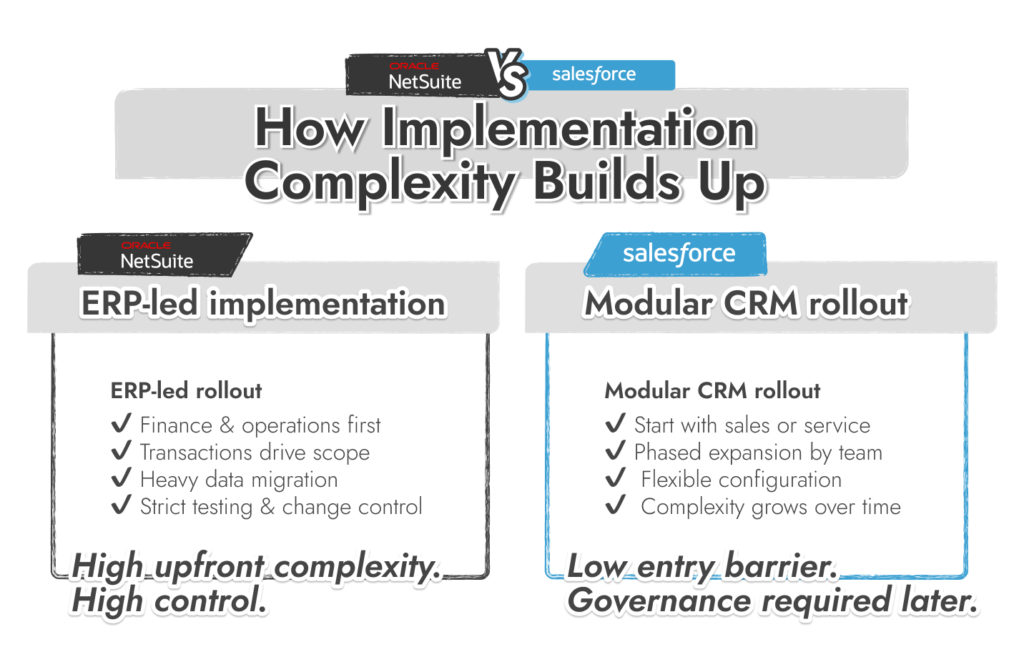
NetSuite projects are usually ERP-led.
Scope often includes finance, billing, inventory, fulfillment, and reporting
Cost characteristics
Salesforce projects are usually modular.
Cost characteristics
A NetSuite vs Salesforce decision is driven by where system authority sits. Both platforms can coexist. The question is which one defines structure.
NetSuite fits environments where financial and operational data must remain consistent across the organization.
In this model, CRM functions exist to support transactional accuracy rather than independent workflow design.
Salesforce fits environments where customer activity and revenue operations change frequently.
In this setup, CRM data shapes daily work, while ERP systems handle billing and fulfillment in the background.
A combined Salesforce and NetSuite architecture assigns authority by domain.
This structure is common in organizations where both transaction volume and customer activity scale.
Results with NetSuite and Salesforce depend less on licensing and more on how the system is designed. Most issues don’t show up on day one. They appear later, once automation expands, data models drift, and reports stop lining up. Routine Automation focuses on those risks early. We help teams with:
Work typically starts with a review of existing processes and constraints. Sales, service, and operations requirements are documented before configuration begins. Automation is introduced only where it replaces repeat work or enforces consistency.
Routine Automation also supports phased rollouts. Teams can start with a limited scope and expand without reworking core structures. This approach is used in Salesforce and NetSuite environments where CRM and ERP responsibilities must remain clearly separated.