Want a Field Service Agentforce roadmap?
We’ll review your current Field Service setup, identify the best first use case, and plan a rollout that fits how your teams actually work, from workshops to delivery.





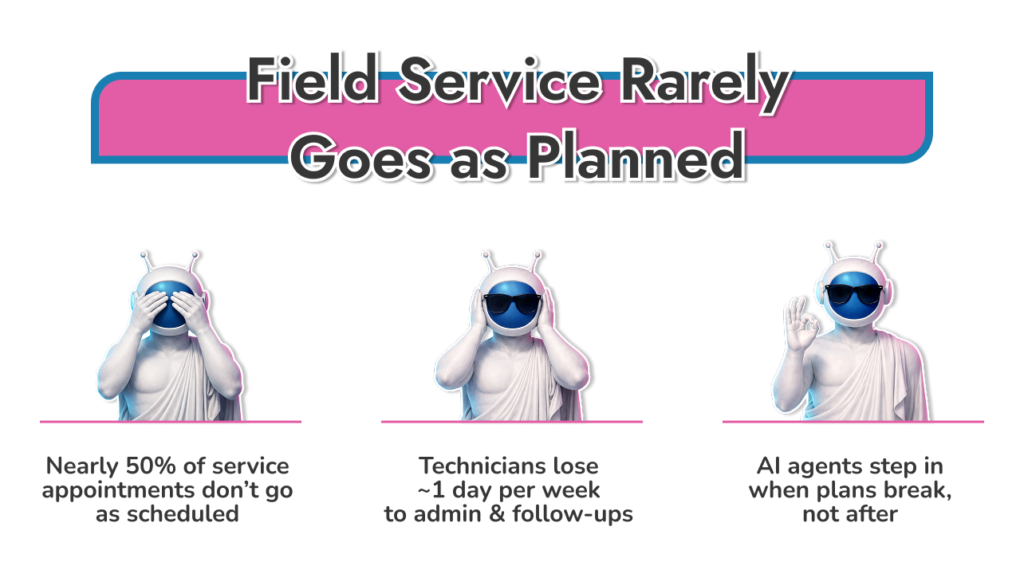
Field service breaks schedules. Not occasionally, all the time. Salesforce research shared in its newsroom shows that nearly half of service appointments don’t go to plan, while technicians lose close to a full day each week to admin and follow-ups instead of fixing problems in the field. That gap is exactly why people end up turning to Agentforce for field service.
Artificial intelligence in Salesforce has gone far beyond chatbots. In field service, Agentforce gives companies an execution layer within Field Service Cloud full of systems that can act: booking jobs, adjusting schedules, and supporting technicians on site, using live CRM and asset data.
That shift matters. When Salesforce field service AI moves from “suggesting” to actually doing, dispatchers spend less time firefighting, and technicians start jobs with context instead of guesswork.
Agentforce for field service is Salesforce adding AI agents directly into Field Service Cloud, so routine work doesn’t keep bouncing back to people. These agents can read live service data, understand what’s happening on a job, and take approved actions when things change.
It matters because field service rarely runs cleanly. Appointments slip. Parts arrive late. Customers reschedule at the last minute. With Agentforce field service, those changes don’t automatically turn into manual work for dispatchers. An agent can update a service appointment, adjust the schedule, and keep records aligned without someone stepping in for every small fix.
Agentforce for FSL isn’t the same as older automation. Rules and flows follow fixed paths. Agents can pause, reassess, and move forward when conditions shift. Some tasks run on their own, like customer scheduling. Others stay assistive, like drafting job summaries or pulling the right asset history before a technician arrives.
In practice, Agentforce FSL works as a support layer. Dispatch stays in control. Technicians get better context. Customers see fewer delays. If you want the wider platform view, What Is Salesforce Agentforce explains how these agents operate across Salesforce in depth.
We review how your dispatch, scheduling, and mobile workflows really work today, then clean up Field Service so AI agents support the operation instead of adding noise.
Field service work doesn’t follow clean paths. Jobs run long. Customers cancel. Dispatchers spend half the day reacting instead of planning.
That’s the problem Agentforce for field service is meant to deal with.
Agentforce 3.0 runs inside Salesforce Field Service, not next to it. The agents work on the same records your team already uses: work orders, service appointments, assets, skills, and territories. There’s no separate system and no “AI screen” to manage.
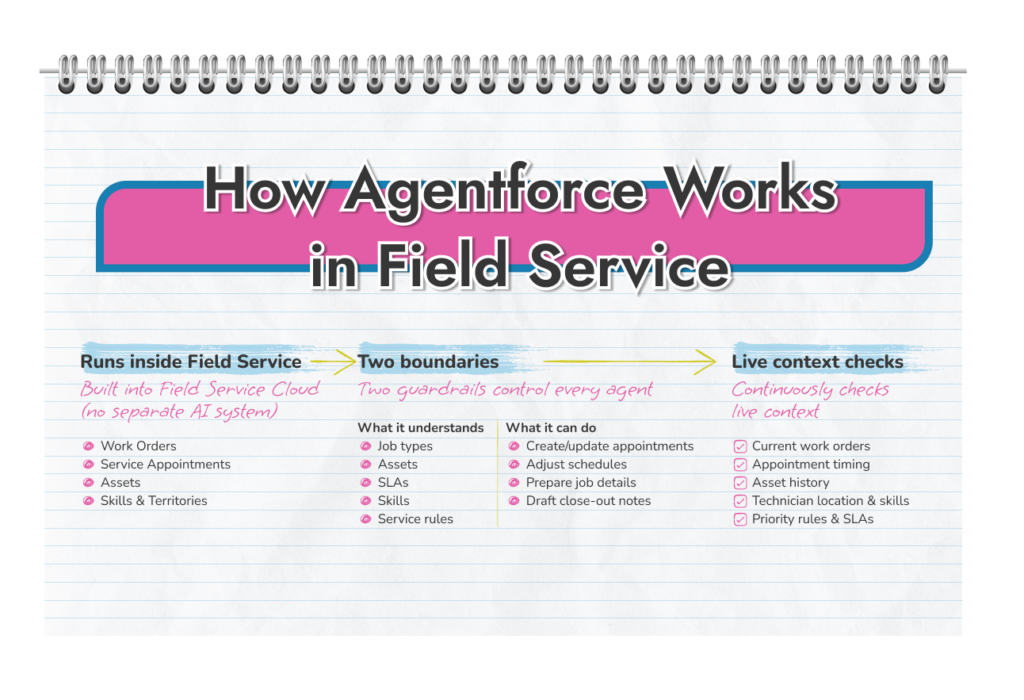
Each agent is set up with two simple limits.
First, what it understands. Job types. Assets. SLAs. Skills. Service rules.
Second, what it’s allowed to do. Create or update appointments. Adjust schedules. Prepare job details. Draft close-out notes.
That’s it.
Because Salesforce field service Agentforce works with live data, it reacts to what’s happening now. If a job finishes early or a customer moves an appointment, the agent doesn’t wait for a rule to break. It can act within the boundaries you’ve set.
Dispatch stays in control. The agent handles the repeat work around them.
Field service is unpredictable. That’s normal.
Field service Agentforce constantly checks:
When something changes, the agent adjusts. It doesn’t stop and wait for manual input unless you tell it to. That’s why Salesforce field service AI only works well when service data is clean and scheduling rules make sense. The agent can’t fix chaos. It can reduce it.
Rules and flows work when everything goes as planned.
Field service rarely does.
Traditional automation follows a fixed path. When conditions change, someone usually needs to step in. Agentforce for field service Salesforce is built for the gaps. It can pause, reassess, and move the job forward without creating more admin work.
This is where Agentforce FSL shows its value by keeping schedules usable when volume rises and plans fall apart.
Most field teams don’t struggle because too much work sits between the request and the fix. Calls bounce around. Schedules break. Technicians arrive without the full picture. Dispatchers spend the day patching gaps instead of improving the plan.
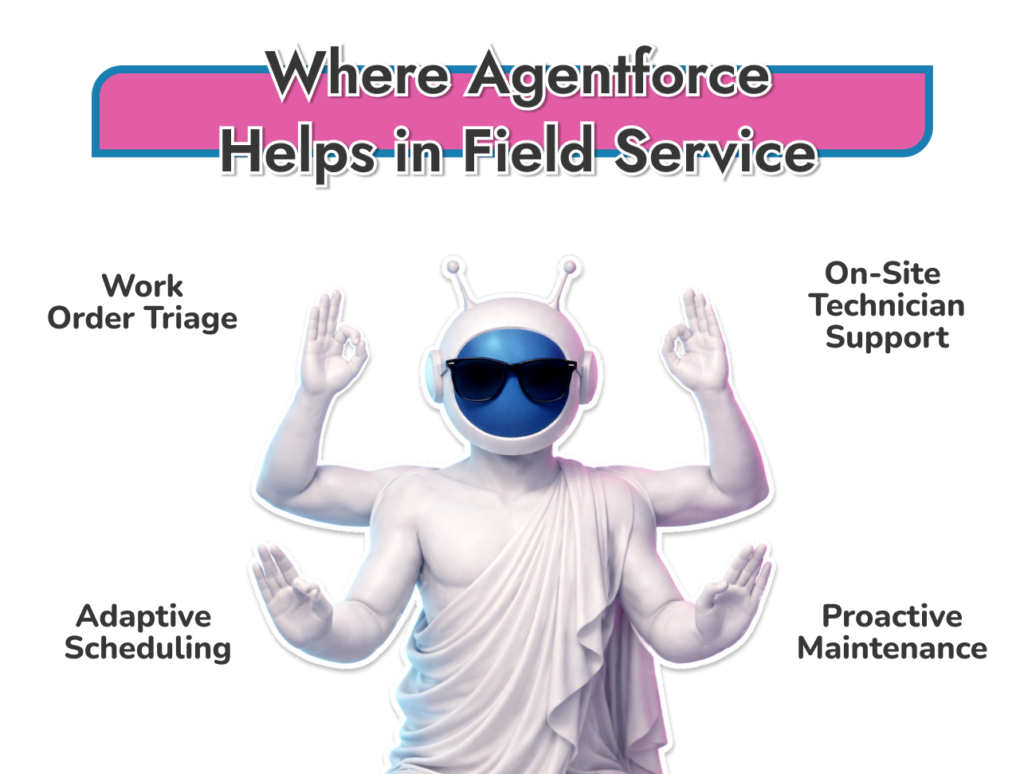
Salesforce Agentforce field service is designed around those pressure points. The use cases below focus on what teams actually deal with: incoming requests that aren’t complete, schedules that change midday, technicians who need answers on site, and assets that fail before anyone expects them to.

We help you choose the right starting use case, prepare Field Service data, and set clear guardrails so agents support the team instead of disrupting it.
Most service requests come in half-formed. Something’s broken. Details are thin. Priority is unclear. Someone still has to make sense of it.
This is an early win for Agentforce field service.
When a request lands, the agent can sort it by job type, check what information is missing, and look at past service history on the same asset. That work happens before dispatch touches the schedule.
Nothing gets auto approved unless you allow it. Dispatchers still decide what matters most. The difference is they start with context instead of a blank screen.
Teams feel this most during busy periods. Backlogs shrink because less time is spent reading, re-reading, and chasing basics. Salesforce field service AI isn’t making decisions for people. It just clears out the clutter so they can make them faster.
Scheduling is where field service loses hours without noticing. Booking an appointment takes time. Changing one takes more. Cancelling one often breaks the rest of the day.
With Agentforce for field service salesforce, customers can book or move appointments using plain language. The agent works out the job type, checks skills, availability, and location, then updates the service appointment.
When plans shift midday, field service Agentforce can also surface gaps caused by cancellations or early finishes. Dispatch can approve changes instead of rebuilding the schedule by hand.
Technicians lose time before they even start the job. Digging through history. Looking for notes. Calling back to the office.
With Agentforce for FSL, that prep work happens earlier. The agent pulls asset history, recent fixes, and open issues into a short brief. Some teams deliver it as audio so techs can listen while driving.
On site, Agentforce FSL can guide troubleshooting. Step by step. Based on what’s already been tried. Manuals, past cases, and photos taken on the job all feed into the flow.
When the work is done, the agent drafts the summary. The technician edits it and moves on.
Most emergency jobs don’t start as emergencies. They start as warnings no one had time to act on.
With salesforce field service Agentforce, agents can watch asset history and usage patterns. When something crosses a threshold, the system can flag it, notify the customer, and suggest a service visit.
This spreads work out. Fewer last-minute calls. Fewer broken schedules. Dispatch gets time back to plan instead of react.
For teams asking: “What use-cases does Agentforce support for field service?” this is the longer-term value. A service operation that feels steadier, week to week.
Use cases sound good on paper. What matters is how they hold up when crews are stretched, demand spikes, and plans fall apart. The examples below show where Agentforce for field service fits into real operations, not ideal ones.
Utility field work runs on pressure. Outages don’t wait. Weather doesn’t care about schedules. Safety rules leave no room for shortcuts.
This is where Salesforce Agentforce field service tends to show value quickly.
Before a technician heads out, the agent can prepare a clear brief. Asset details. Past incidents. Known risks. Crews arrive with context instead of chasing it on site. During the job, guided steps help keep work consistent, especially when teams are pulled together quickly during peak events.
Dispatch also feels the difference. When schedules shift because a job runs long or an outage spreads, field service Agentforce helps adjust plans without rebuilding the day from scratch. Fewer manual fixes. Fewer missed handoffs.
Over time, utilities also benefit from cleaner close-out data. Job summaries are drafted, reviewed, and logged consistently. That matters when audits, reporting, and long-term maintenance planning come into play.

Connect scheduling, asset data, and technician support in one Salesforce workflow so outage response and maintenance work move faster without losing control.
Manufacturing service work leaves little room for guesswork. Assets are expensive. Downtime costs real money. One wrong fix can trigger a second visit or a warranty issue.
This is where Agentforce for field service fits naturally.
Before a technician arrives, the agent can pull together asset history, past repairs, and open issues into a short prep view. No hunting through old cases. No calls back to the office to confirm what was done last time. Technicians start the job with the right context.
On site, Salesforce field service Agentforce supports troubleshooting by surfacing manuals, known failure patterns, and similar fixes from past work. It doesn’t decide how to repair the asset. It helps the technician move faster and avoid repeated mistakes.
After the job, close-out matters just as much. Field service Agentforce can draft a clear service summary that the technician reviews and adjusts. That keeps records consistent and helps engineering and service leaders see patterns across the installed base, not just one-off fixes.

Support technicians with better prep, clearer troubleshooting, and cleaner close-out, without adding more admin to the day.
Telecom field service is volume driven. Short appointments. Tight windows. Little tolerance for repeat visits.
That pressure is exactly why salesforce Agentforce field service shows up well here.
Before an install or repair, the agent pulls customer history, prior tickets, and equipment details into a quick brief. Technicians don’t walk in blind. They know what’s been tried and what failed.
During the visit, Agentforce FSL can guide checks step by step. If a technician takes a photo of a setup or connection, the agent can compare it against known issues and point out likely problems. That saves time and reduces back-and-forth with senior staff.
Once the job is done, Agentforce for FSL helps with clean wrap-up. Notes are drafted, records updated, and the technician moves on.
For teams managing high appointment volume, this is where Agentforce AI scalability features for sales service field teams start to matter.
Companies often worry about Agentforce for field service pricing. What they should really be focusing on is the return on investment. Agentforce for sales and field service teams pays off in time saved, fewer repeat visits, and calmer days for dispatch and technicians. When the work around the job gets lighter, the job itself gets better.
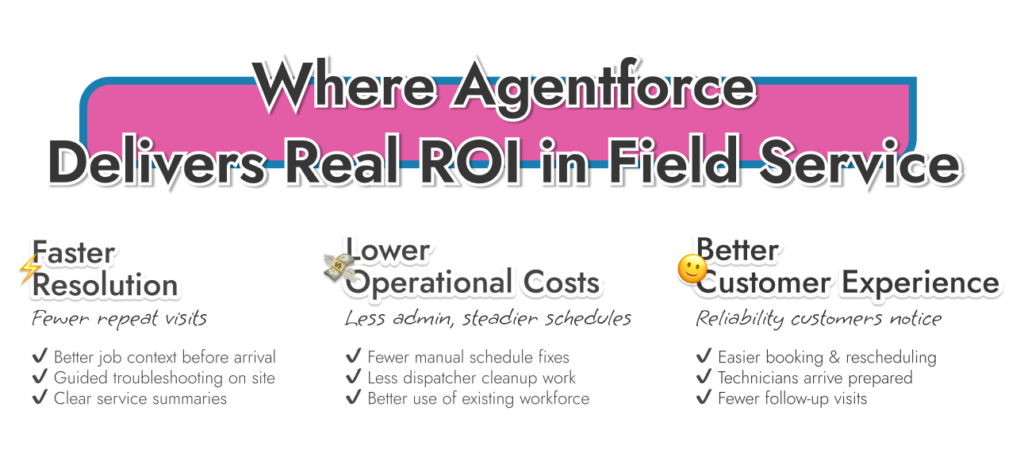
Repeat visits rarely come from lack of skill. They come from missing context, rushed prep, or incomplete troubleshooting.
With Salesforce field service Agentforce, technicians arrive with clearer job details and better history. On site, guided steps reduce guesswork, especially for less familiar assets. When the work is done, clean summaries make the next visit easier if one is needed.
The result is fewer second trips and faster resolution on the first visit. For teams already stretched thin, that difference compounds quickly across a week.
Scheduling and admin work quietly eat budget. Every manual change drags a dispatcher out of planning mode and into cleanup work that never shows up on a report.
Field service Agentforce reduces that drag by handling the repeat work around appointments and job updates. Schedules hold together longer. Idle time drops. Dispatch spends more time managing capacity instead of fixing breakage.
Over time, Salesforce Agentforce field service helps teams use the workforce they already have more effectively, rather than adding headcount just to keep up.
With Salesforce field service AI, appointments are easier to book and move. Technicians arrive prepared. Fewer jobs need follow-up visits. Communication improves because updates stay accurate.
That consistency matters because it’s reliable. In field service, that’s often what turns a single job into a customer who sticks around.
When teams ask what justifies Agentforce for field service pricing, this is usually the answer. Not features, but steadier operations and fewer failures that customers remember.
Agentforce for field service only works because it’s built into Field Service Cloud, not layered on top of it. There’s no new system to manage and no parallel workflow for teams to learn. The agents operate on the same records, rules, and permissions your operation already relies on.
Field Service Cloud handles the fundamentals. Work orders. Service appointments. Scheduling logic. Mobile execution. That foundation doesn’t change. What Salesforce field service Agentforce adds is the ability to act inside those structures when things shift during the day.
Einstein features inside Field Service Cloud already help surface insights and recommendations. Agentforce goes a step further. It can take approved actions. That includes updating appointments, preparing job briefs, or drafting summaries without waiting for a manual step. The distinction matters. Suggestions still leave work behind. Actions remove it.
This is why Agentforce for field service Salesforce works best when Field Service Cloud is well set up. Clean asset data. Clear skills and territories. Sensible scheduling rules. When those pieces are in place, agents support the operation instead of fighting it.
Agentforce for field service isn’t a default switch you flip on. It works best in certain operating conditions. Outside of those, it can add friction instead of removing it.
Teams tend to see strong results when these conditions are already present:
In these environments, field service Agentforce absorbs the repeat work that usually piles up during the day.
There are also clear prerequisites teams shouldn’t ignore:
Without these basics, Agentforce for FSL will surface problems instead of solving them. The technology follows the process you give it. If the process is unclear, the results will be too.
If Agentforce for field service struggles, it’s rarely because of the agent. It’s almost always because the basics aren’t solid.
Data comes first. Assets need to be accurate. Skills and territories need to match reality. SLAs need to reflect how work is actually prioritized. If those pieces are off, the agent will surface the problem quickly, but it won’t fix it.
Ownership matters just as much. Someone has to decide what can change automatically and what needs approval. Scheduling rules, customer outreach, and rescheduling all need clear limits. Without them, Salesforce Agentforce field service creates confusion instead of relief.
Permissions are another common gap. Agents act inside Salesforce, so access has to be deliberate. The goal isn’t speed. It’s control with less manual effort.
Teams that see results usually start small. One use case. One group. Measure the impact. Adjust. Then expand. That keeps field service Agentforce tied to outcomes, not assumptions.
Salesforce Agentforce implementation doesn’t work well when it’s dropped into a messy operation. It works when it’s shaped around how teams already work.
We start by looking at scheduling, dispatch, mobile work, and close-out. Not diagrams. The real day-to-day flow. Where time leaks out. Where handoffs break.
From there, we prepare the data and structure, so Agentforce FSL has something reliable to act on. Clear rules. Clear permissions. Clear ownership.
Configuration focuses on real scenarios, not generic demos. We set guardrails so agents help without surprising anyone. Once live, we track simple signals: schedule stability, admin time, repeat visits. That feedback keeps Salesforce field service AI useful as volume grows.
Field service doesn’t fail because teams lack effort. It fails because plans change, details get missed, and too much time is spent holding the operation together by hand.
That’s where Agentforce for field service fits when it’s used properly. Not as a layer of advice, but as execution support inside Salesforce. Scheduling holds together longer. Technicians start jobs with context. Dispatch spends less time fixing yesterday’s problems.
The teams that see real value don’t chase every feature. They focus on a few pressure points and build from there. Clean data. Clear rules. One use case at a time. When that foundation is in place, Salesforce Agentforce field service becomes less about AI and more about keeping work moving.
If your service operation already feels stretched, this isn’t about adding something new. It’s about taking weight off the people who keep it running.