 Suomi
Suomi Français
 Deutsch
 Polski
Discuss Your Salesforce Commerce Setup
If you’re weighing a custom Salesforce rollout, we can help with consulting, strategy workshops, and technical guidance shaped around your real buying and operational workflows.


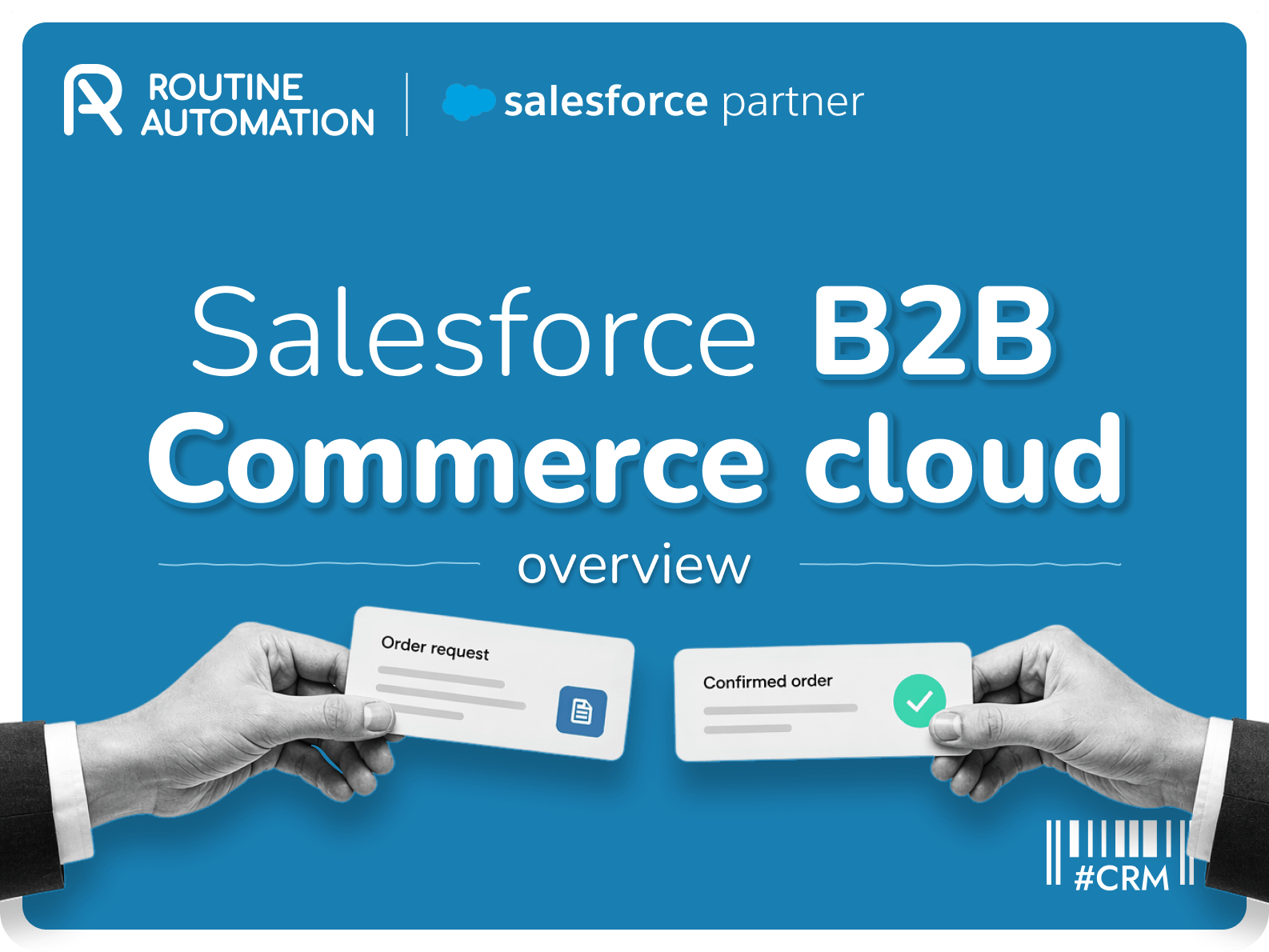

A lot of B2B buying still feels weirdly manual for something that’s supposed to be repeatable. A customer already knows what they need. They’ve bought it before. The price is already agreed. Yet the order still ends up in someone’s inbox, or buried in a spreadsheet, or waiting on a rep to re-enter details that shouldn’t need re-entering.
That’s the sort of friction that pushes companies toward Salesforce B2B Commerce Cloud. Not because the idea of digital commerce sounds exciting, but because too much revenue work is still held together by habits and workarounds.
Salesforce B2B ecommerce gives customers a way to log in, see the right products, see the right price, and place orders without dragging sales and support into every routine purchase.
Still, not everyone needs this. The platform can be a strong fit. It can also be more system than some businesses actually need. The useful question isn’t “Does Salesforce do B2B commerce?” It does. The useful question is whether your buying model actually needs account-based pricing, buyer permissions, shared customer data, and tighter control over how orders move through the business.
Salesforce B2B Commerce Cloud is a self-service ordering platform for businesses that sell to other businesses. It lets customers log in, see the products and prices tied to their account, and place orders without sending another email to sales for something they’ve already bought three times before.
SFCC B2B focuses on:

Self-service ordering
Negotiated pricing
Buyer-specific catalogues
Account-based access
Reordering
It’s valuable because B2B buying usually has more rules than a normal online store. One customer gets contract pricing. Another only sees certain products. Another has several buyers under one account, all with different roles.
The other reason people look at this platform is simple. It sits inside Salesforce. So if your teams already use Salesforce for accounts, sales, or service, commerce doesn’t have to live in a separate system with its own version of the customer. Salesforce B2B Commerce Cloud features a prebuilt store framework and shared commerce data model, too, which helps speed up setup but makes the early structure choices more important.
Build Better B2B Ordering
We help businesses shape Salesforce B2B Commerce around pricing rules, buyer access, and self-service ordering that works in practice.
If you’ve asked “What is Salesforce Commerce Cloud?” before you’ll know there are two versions.
Salesforce B2B ecommerce is built for a buying process with rules. B2C usually isn’t.
In consumer ecommerce, most people see the same catalogue, the same price, and the same checkout. In B2B, two customers can land on the same store and need completely different experiences. One gets contract pricing. One can only buy a limited product range. Some have several buyers under the same company account, and each person has a different level of access.
B2B buying tends to come with the kind of conditions a regular ecommerce setup doesn’t handle well:

Negotiated pricing
Account-based access
Repeat ordering
Bulk purchases
Multiple buyers inside one company
Location-specific shipping or billing rules
That’s why a dedicated B2B commerce setup exists in the first place. It’s not about making the storefront feel more enterprise. It’s about making the buying process match the commercial relationship behind it.
And the stakes are in B2B are higher. These orders can involve hundreds of items and values in the hundreds of thousands of dollars. Once that’s true, small mistakes stop being minor annoyances. They start hitting margin, fulfilment, and customer trust.
Area | B2C commerce | B2B commerce |
Buyer | One shopper | A business account |
Pricing | Mostly the same for everyone | Negotiated or account-specific |
Access | Open storefront | Controlled by account, role, or location |
Order pattern | Smaller, mixed purchases | Bulk, repeat, or planned purchases |
Checkout | Standard flow | Shaped by business rules |
Reordering | Helpful | Usually essential |
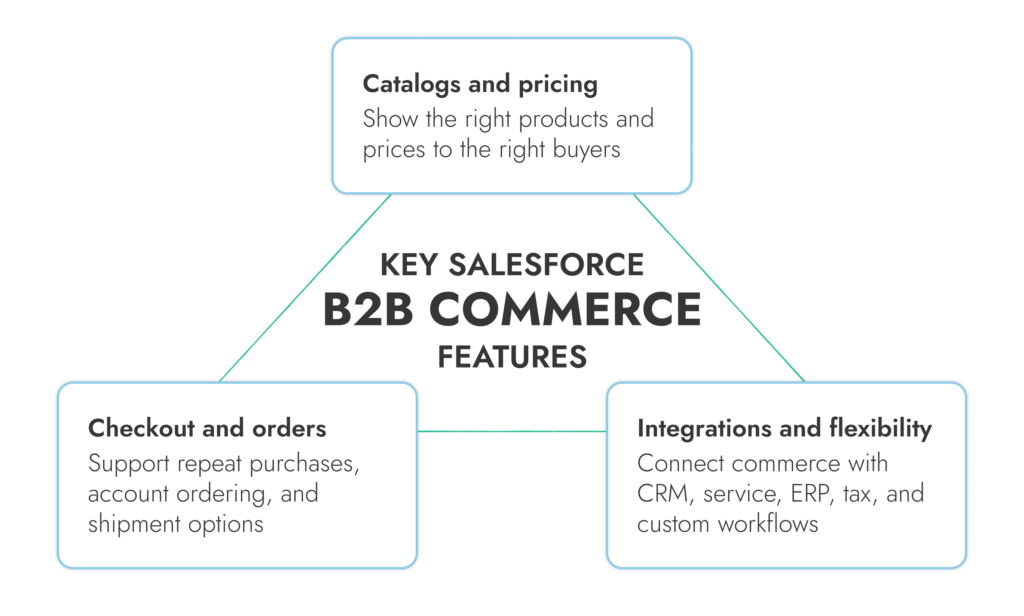
The best Salesforce B2B commerce features deal with the stuff that usually makes B2B ordering annoying in the first place. The wrong product set, reorders that still need a rep, shipping choices that live in email threads, and systems that don’t agree with each other.
Feature area | What it does | Why it matters |
Catalogs and pricing | Shows the right products and prices to the right buyer | Cuts down pricing mistakes and manual checks |
Checkout and orders | Handles repeat orders, account purchasing, and shipment choices | Makes routine buying quicker |
Integrations and flexibility | Connects commerce to CRM, service, ERP, tax, and custom storefront logic | Stops the storefront becoming its own little island |
With Salesforce B2B Commerce Cloud, different buyers can see different catalogs, different prices, and different permissions based on who they are and what account they belong to. You’ve got account and buyer entitlements, negotiated pricing, tailored promotions, and personalized catalogs.
That setup is driven by buyer groups, entitlement policies, buyer accounts, and price books. That means the store can decide who gets to see a product, who gets to see the price, and which commercial terms apply before anyone hits checkout.
Checkout matters more in B2B. If this part is clumsy, the whole “self-service” promise falls apart fast. Salesforce promises fast checkout, preferred payment options, split shipments, multiple shipping speeds, and cross-channel order management for large-volume orders. That lines up with what B2B buyers actually need when they’re placing repeat or high-value orders.
That said, order visibility only feels good when the systems behind it are trustworthy. If inventory, fulfillment, or back-office order data is messy, the storefront won’t save you. Many companies using Salesforce CRM discover that.
Flexibility decides whether B2B Commerce Cloud Salesforce becomes a clean extension of the business or just another platform to maintain. Salesforce’s storefront APIs cover cart, checkout, catalog, account, wishlist, pricing, promotions, tax, search, and other experience services, which gives teams room to connect commerce with CRM, service, ERP, and third-party tools without rebuilding everything from scratch.
There’s also more flexibility here than people sometimes assume. Salesforce gives you headless commerce APIs, custom fields for tailored purchase journeys, and newer customizable storefront components built on open-source Lightning Web Components. That matters when the default storefront gets close, but not quite close enough, to the way a business actually sells.
Companies usually end up looking at B2B Commerce Cloud Salesforce for one reason: too much routine buying still depends on people doing work the system should’ve handled.
A customer wants to reorder. Sales gets copied in. Support gets dragged in when the order status is unclear. Ops checks pricing or availability in another system.
That’s where the platform shows practical value:

Buyers can place routine orders on their own
Repeat purchases take less effort
Pricing and product access are easier to control
Order data is easier to trace back to the right account
Teams spend less time answering questions the storefront should answer
Self-service ordering and reordering can take a lot of pressure off the business. More customers can buy without waiting around, service teams spend less time dealing with basic order requests, and deals don’t get held up by work that should’ve been handled in the system already.
That matters inside the company as much as it does for the buyer. Sales teams feel it pretty quickly. Fewer repeat orders pile up. Reps get more room for pricing discussions, bigger opportunities, and the kind of account work that actually needs human judgment.
For service teams, it means fewer basic order-status questions and better visibility when commerce is tied back to the same customer record. That part gets overlooked a lot. A self-service storefront isn’t just there to help buyers buy. It should also stop internal teams from spending half their day translating between systems.
For operations, the win is usually cleaner handoffs. Fewer emails. Fewer manual checks. Fewer “which price was agreed?” conversations after the order is already in motion.
Cut Manual Work From B2B Ordering
We help teams turn repetitive ordering, pricing checks, and disconnected workflows into a cleaner Salesforce setup that saves time across sales, service, and ops.
The Salesforce B2B Commerce Cloud data model is just the structure that tells the platform who the buyer is, what they’re allowed to see, what price they should get, and how an order connects back to the right account.
In a weaker setup, product data lives in one place, customer rules live somewhere else, pricing sits in another system, and order history gets pulled in later if it gets pulled in at all. In SFCC B2B, those pieces are meant to work together more closely inside the same environment. Products, buyer accounts, price books, catalogs, carts, and orders are linked through a shared model, so the storefront can reflect the actual customer relationship.
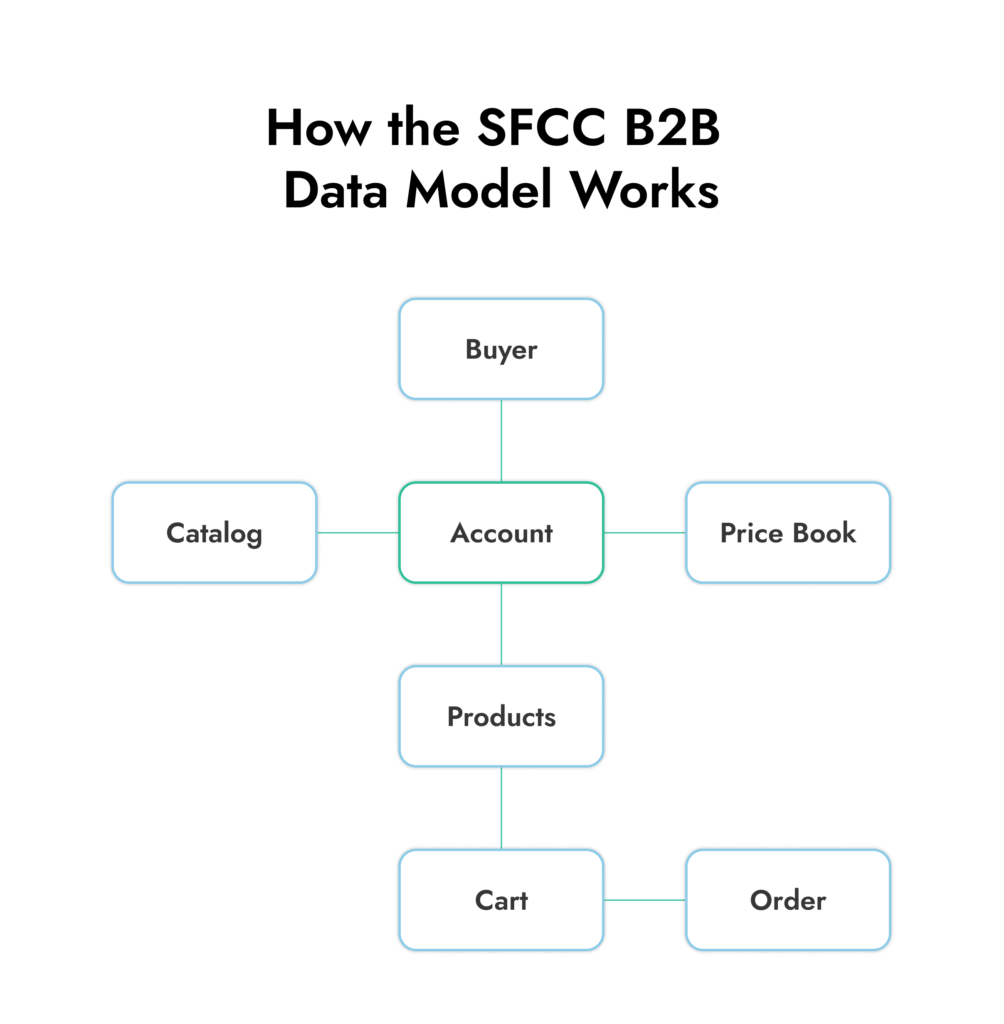
Shared data helps answer basic questions quickly:

Which buyer belongs to which account
Which products that buyer can access
What price they should see
What they ordered before
How that order ties back to the rest of the customer record
It also explains why setup decisions matter early. Buyer groups, entitlements, and price book logic shape what the customer sees and how cleanly the system behaves later. That’s why companies often turn to experts for help preparing their data for Salesforce ecommerce integration.
B2B Commerce Cloud implementation sounds simpler than it is. At first, it looks like a storefront project. Pick a design, load products, connect checkout, done. In real projects, that’s rarely the hard part. The harder part is deciding how the business actually wants customers to buy. Who sees what. Which prices apply to which accounts. What happens when someone reorders. Which system owns inventory, tax, shipping, or order status once the order leaves the storefront.
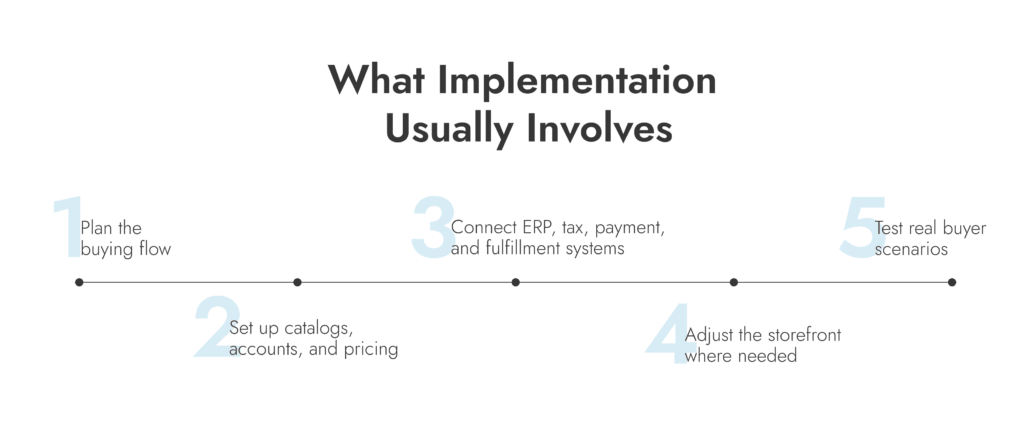
That’s why the work usually spreads across a few areas at once:
Planning the buying flow
Setting up catalogs, accounts, and pricing
Connecting erp, payment, tax, or fulfillment systems
Adjusting the storefront where the default setup falls short
Testing what happens when real customers do different things
That last part is important. For most companies using SFCC B2B, the problems show up when a buyer has the wrong account access, a contract price doesn’t match, a repeat order behaves differently from a first-time order, or shipping logic breaks once a larger order gets split.
Salesforce’s storefront APIs give teams room to work across cart, checkout, pricing, promotions, tax, search, wishlists, and order services. That’s useful. It also tells you how many parts can be involved once the setup moves beyond a basic storefront.
There’s usually a judgment call in the middle of all this. Stay close to the standard setup and launch faster, or shape more of the experience around how the business already sells. Neither option is automatically right. Some teams customize too early and make the project heavier than it needs to be. Others stay too close to the default and end up pushing messy work back onto sales or support.
Even after launch, the job isn’t really over. Salesforce keeps shipping B2B Commerce changes, which means teams still need testing, upkeep, and someone paying attention after go-live.
A B2B Commerce Cloud consultant usually becomes useful right around the point where the project stops being “just launch the store” and turns into “wait, which system owns pricing, account access, and order status?”
A Salesforce B2B Commerce Cloud partner is usually worth bringing in when the work includes:
Migration from another ecommerce or portal platform
Custom pricing or buyer entitlements
Erp, tax, payment, or fulfillment integrations
Complicated account hierarchies
Storefront changes that go beyond the standard setup
At that point, a SFCC B2B consultant with real experience can help a lot. SFCC B2B consultants like Routine Automation don’t just build, they help decide what should stay standard, what actually needs customization, and where the process itself is the real problem.
If you’re looking for a SFCC B2B consulting partner you can trust, Routine Automation ranks as one of the top Salesforce consulting companies for all kinds of builds.
Need a Clear Salesforce Plan?
We help teams sort out pricing logic, integrations, account structure, and rollout scope before small Salesforce decisions turn into expensive rework.
This is the hardest thing for most companies to decide based on a generic Salesforce B2B Commerce Cloud overview. Really, Salesforce B2B Commerce Cloud is a strong fit when the buying process already has a lot of rules baked into it.
That usually means:
Account-based pricing
Repeat or bulk orders
Multiple buyers under one customer account
Product access that changes by customer or role
A need to connect commerce with salesforce data, sales activity, or service history
If that sounds like your business, the platform makes sense. If your catalog is simple, pricing is mostly the same for everyone, and the store can live quite happily on its own, it may be more system than you need.
Routine Automation supports businesses that need help evaluating, shaping, and improving Salesforce B2B Commerce Cloud setups, especially when the hard part isn’t the storefront itself, but everything around it:
Integrations with ERP, tax, payment, or fulfillment systems
Process design for ordering, account access, and reorders
Adapting SFCC B2B to the way the business actually sells
Customizing the setup where the default model falls short
Cleaning up the gaps that show up after launch
The same thinking also applies outside pure B2B use cases. Some teams need help shaping Salesforce around more mixed ecommerce workflows, where B2B and B2C logic overlap and the process gets messy fast. RA adapts Salesforce to match your workflows.
Salesforce B2B Commerce Cloud is a B2B ordering platform built inside Salesforce. It gives customers a way to log in, see the products and pricing tied to their account, and place repeat orders without sending everything through sales.
The main Salesforce B2B Commerce features cover the stuff B2B teams usually care about first: pricing by account, catalogues that change by customer, access controls, repeat ordering, and checkout that fits business buying. The handiest Salesforce B2B Commerce Cloud features are the ones that cut out routine admin.
Salesforce B2B ecommerce works by tying the storefront to account records, pricing rules, product access, and order data. So when a customer signs in, they don’t get a generic store. They get the products, prices, and buying options that fit their account.
B2C Commerce is built for regular consumer checkout. SFCC B2B is built for company purchasing, where pricing can change from one account to the next, several buyers may sit under one customer, and repeat ordering is a much bigger part of the job.
B2B Commerce Cloud implementation usually includes pricing setup, buyer access, catalogue structure, integrations, storefront configuration, testing, and cleanup after launch. The storefront setup is only one part of the job.
A business should work with a Salesforce B2B Commerce Cloud consultant when the project involves migration, custom pricing, complex account structures, or system connections that are hard to manage in-house. A Salesforce B2B Commerce Cloud partner can also help when the team needs a clearer rollout plan.