Talk Through Your Salesforce Integration
Routine Automation offers consulting sessions and technical workshops to help teams plan Salesforce integrations that support real workflows, automation, and reporting.




Marketing hits send on a Mailchimp campaign. A few hundred opens roll in. A handful of people click the offer. Someone on the sales team asks, “Which leads should I call first?”
They open Salesforce, and the answer isn’t there. No clicks, no campaign context. Just the same contact record from last week. That’s a common problem for so many companies, and the main reason they start looking for Mailchimp Salesforce integration options.
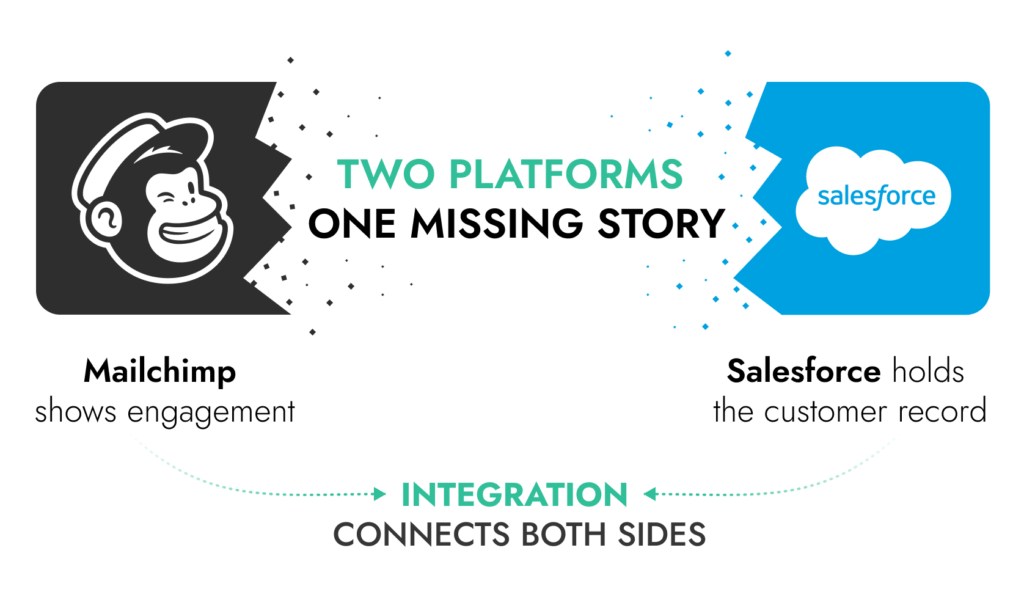
Mailchimp is where campaigns happen. Salesforce is where the customer history lives. When the two systems don’t talk to each other, the data splits into two timelines. Marketing sees engagement and subscriber activity. Sales sees deals, contacts, and tasks. Neither side sees the whole story.
You can try to patch the gaps with exports, but the cracks just keep building. A few weeks in, segmentation starts drifting. Someone uploads an outdated list. A contact who unsubscribed gets emailed again. The CRM fills with duplicate records that nobody fully trusts.
A working Mailchimp integration with Salesforce implemented by a professional team like Routine Automation fixes that by keeping campaign data tied to the same records sales already uses. Salesforce documentation describes the Mailchimp connection as a way to import CRM contacts into Mailchimp audiences and view campaign activity directly within Salesforce. Once that loop exists, marketing and sales connect like never before.
So, what does it actually take to connect Mailchimp to Salesforce without breaking the CRM along the way?
First, can Mailchimp integrate with Salesforce in the first place? Yes, in a few ways.
Most companies connect the systems using a package from Salesforce AppExchange. The connector many teams install today comes from Beaufort 12 and appears in Mailchimp’s official integration directory.
Mailchimp’s support materials also point newer setups, particularly those created after May 1, 2024, toward that connector and its documentation. Once installed, admins decide how contacts, subscriber status, and campaign activity move between Mailchimp and Salesforce.
That’s the short answer to “does Mailchimp integrate with Salesforce?” The longer answer is that the experience depends heavily on how the connection is built.
Some teams only push contacts from Salesforce into a Mailchimp audience before a campaign goes out. Nothing else moves back. Others configure a deeper Mailchimp Salesforce sync so Salesforce records show opens, clicks, subscription status, and campaign membership. Same connector, very different day-to-day usefulness.
There’s also a practical detail worth knowing before anyone installs a Mailchimp Salesforce connector. Salesforce treats AppExchange packages as third-party software. If something inside the connector stops working, Salesforce support usually won’t troubleshoot the package itself. The vendor or the implementation team handles it.
That small detail is why many companies approach Salesforce Mailchimp integration carefully. The connection becomes part of the CRM’s data structure, not just another plugin.
There are always options when you’re integrating Salesforce with anything. You might have noticed that if you’ve been looking up how to send mass email in Salesforce for a while.
Three approaches handle the majority of ways to connect Salesforce to Mailchimp. One relies on the official package listed in Mailchimp’s integration directory. Another uses automation tools that move data between systems. The last option skips connectors entirely and links the platforms through their APIs. Each route creates a different level of Mailchimp Salesforce sync, and the differences matter once campaigns start relying on CRM data.
| Integration method | Best for | Setup complexity | Flexibility | Typical use cases | Main limitations |
| AppExchange connector (Mailchimp for Salesforce) | Teams with standard lead and contact structures | Moderate | Moderate | Keeping audiences aligned and displaying campaign activity inside Salesforce Mailchimp records | Less adaptable when the CRM has unusual objects or heavily customized workflows |
| Automation platforms | Teams that want quick data handoffs between tools | Low–Moderate | Moderate | Updating lists, triggering campaigns, or moving form submissions into Mailchimp | Sync logic can become hard to track as data flows grow |
| Custom API connection | Companies with more complicated environments | Higher | Higher | Mapping custom objects, controlling how the integration behaves on a deeper level, or building tailored automation | Demands more development work and ongoing ownership |
The right setup really depends on how much control the company wants over its data. A simple CRM can run just fine with a connector. Once Salesforce gets more customized, teams often end up building a deeper Mailchimp and Salesforce integration that fits their data model instead of bending the CRM around the connector.
Nobody shows up at a business one day and tells the team they have to integrate Mailchimp with Salesforce. People tend to recognize the need for the connection themselves, when issues start building up. Marketing sends a campaign through Mailchimp and sees who opened it within minutes. Sales opens Salesforce and has no idea any of that happened.
Both teams are working with the same contacts, yet the activity sits in different systems. Someone eventually exports a list, uploads it somewhere else, and the data drifts a little further apart.
When Salesforce and Mailchimp integration is set up properly, those gaps shrink. Campaign activity stays tied to the same records sales already uses, and marketing stops relying on static lists pulled from the CRM weeks earlier.
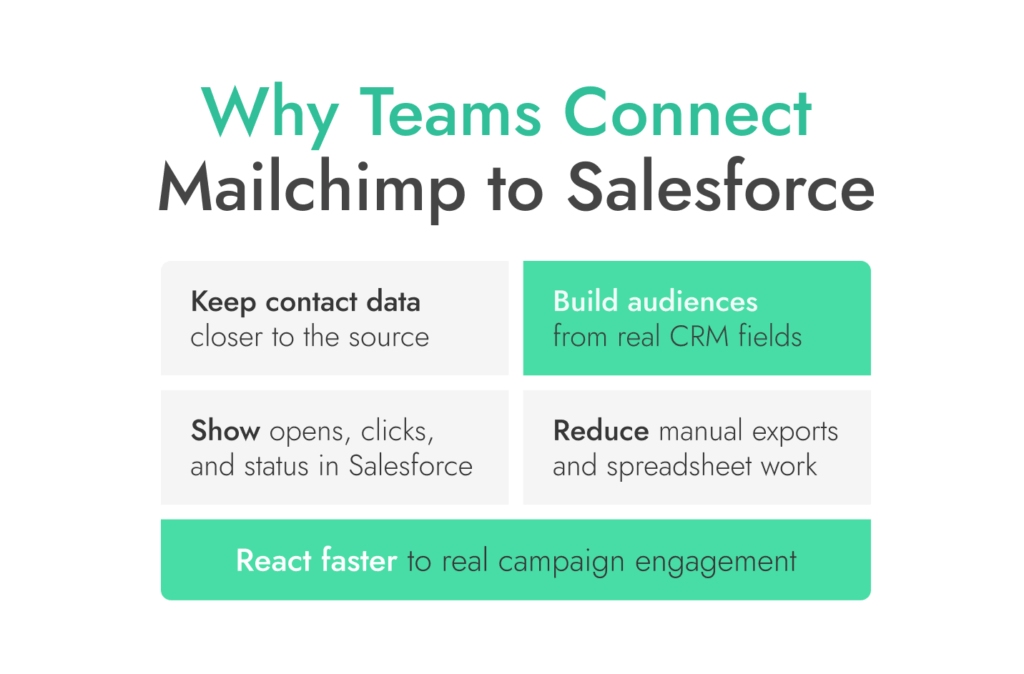
The connection helps in a few practical ways:
A connection between Salesforce and Mailchimp doesn’t magically clean the CRM. If the underlying data has duplicates or inconsistent fields, the sync will carry that data between systems. When the Salesforce records are reasonably structured, though, Mailchimp to Salesforce integration helps both teams work from the same customer history instead of two partial versions.

Routine Automation helps teams connect marketing tools with Salesforce, so campaign data, contacts, and automation stay aligned inside the CRM.
The setup for Mailchimp Salesforce integration often sounds simpler than it turns out to be. Installing a connector or linking two accounts isn’t complicated. The real work usually happens beforehand, when teams decide what information should move between systems and who actually needs it.
If you’ve read our Salesforce and Outlook integration guide, you’ll know a lot of integration problems start earlier than people expect. A connector gets installed, the first sync runs, and only then does someone notice the Mailchimp audience structure doesn’t match the CRM. Or that half the Salesforce fields never got mapped. Walking through a few clear steps upfront saves a lot of cleanup later.
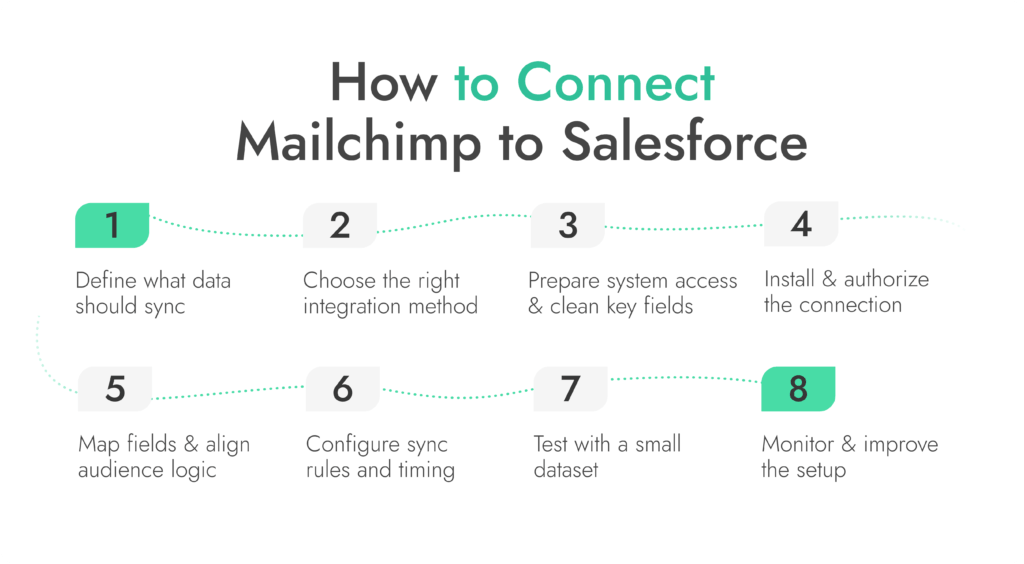
Start with the records that matter. In most cases, Mailchimp integration with Salesforce revolves around:
Marketing may want segmentation fields such as lifecycle stage or region. Sales might only care about campaign engagement showing up on the contact record. RevOps often wants both systems aligned so reporting makes sense.
The key point is deciding what the integration is supposed to accomplish. Some teams want audiences built from CRM data. Others want email engagement visible inside Salesforce. A few want campaign activity to trigger workflows.
After defining the data flow, the next decision is how to integrate Mailchimp with Salesforce.
A standard connector often covers basic needs. It can push contacts into Mailchimp audiences and bring campaign activity back into Salesforce records. For organizations with simple CRM structures, that may be enough.
Automation platforms sometimes sit in the middle when teams want lightweight workflows. They can move form submissions, update audiences, or pass campaign activity between tools without development work.
More complex environments lean toward API-based setups. Custom objects, advanced segmentation logic, or strict data governance rules usually require more control than a generic connector provides.
This is where implementation partners help. Routine Automation works with companies that need guidance on how to use Mailchimp with Salesforce effectively, keeping the integration aligned with their CRM architecture rather than forcing the system to fit a default connector design.
Before turning on the sync, both systems need to be ready.
Admin permissions in Salesforce and Mailchimp must allow the integration to read and write data. Without the right access roles, connectors fail quietly or only move partial information.
Cleaning a few key fields beforehand also saves trouble later. Email fields, lifecycle stages, and ownership rules should be consistent before records start syncing between Salesforce and Mailchimp.
Audience structure matters as well. Mailchimp lists or audiences should correspond to clear groups in Salesforce. Otherwise contacts end up scattered across lists that don’t match the CRM.
One final detail people overlook: naming conventions. Field names, segmentation labels, and campaign identifiers should be clear before the connection starts running. Once Mailchimp Salesforce sync begins, those labels appear in both systems and become much harder to change.
Once the planning is done, the connection itself is fairly routine. A Mailchimp Salesforce connector gets installed in Salesforce or the integration is created through whatever platform the team chose earlier.
Both systems need permission to talk to each other. An administrator usually signs in to Mailchimp and approves access from Salesforce. That authorization step allows the integration to read contacts, update audiences, and record campaign activity. Nothing moves yet. It just opens the door.
Running the first Mailchimp to Salesforce integration against the entire CRM right away can be risky. Many teams start with a smaller test group or a sandbox environment. That makes it easier to confirm records sync in the right direction and that nothing unexpected appears on contact records before the integration touches thousands of records.
Once the connection exists, the systems still don’t understand each other’s data. That’s where field mapping comes in.
Field mapping tells the integration how a Salesforce field relates to a Mailchimp field. Email is the obvious one. After that things get more interesting. Lifecycle stage, account ownership, industry, region, and consent status often need to travel from Mailchimp to Salesforce, and back as well.
Mailchimp stores many of these values as merge fields. Those fields feed segmentation and personalization inside campaigns. If the mapping is done carefully, marketing can build audiences from CRM data instead of rebuilding lists by hand.
Details matter here. Two fields that look similar can still break things if the formats differ. A lifecycle stage labeled one way in Salesforce and another way in Mailchimp can throw segmentation off. Inconsistent email mapping can also create duplicate contacts pretty quickly.
That’s why most Mailchimp Salesforce integration projects spend time reviewing the field structure before turning on the full sync.
With fields aligned, the next step is deciding how information should move between systems.
Some teams run a one-direction connection where Salesforce sends contacts to Mailchimp but campaign activity stays inside Mailchimp. Others prefer a deeper Mailchimp Salesforce sync that sends engagement signals back to Salesforce. Opens, clicks, and subscription changes can appear on the contact record once the sync runs.
Rules also determine which contacts qualify for syncing. Some companies only include marketing-qualified leads. Others include every contact with a valid email address. The choice depends on how Mailchimp and Salesforce integration fits the company’s marketing process.
Next comes timing. Most integrations sync on a schedule, so engagement from a campaign might appear in Salesforce later. When every small Mailchimp update hits the contact record, the CRM fills up with noise. Good Mailchimp to Salesforce integration rules keep things readable while still passing along useful signals.
Before running the full Mailchimp Salesforce sync across the database, test with a small group of records. A few contacts can expose most issues without touching the entire CRM.
Start by checking field mapping. Make sure values land in the right fields in both systems. Pay close attention to email, lifecycle stage, and segmentation attributes since those often drive audience logic.
Next, test segmentation. Build a small Mailchimp audience from the synced Salesforce data and confirm the right contacts appear.
Campaign activity should be part of the test as well. Send a short campaign to the test group and watch how engagement flows back. Opens, clicks, and subscription changes should appear on the corresponding Salesforce records once the sync runs.
It’s also worth seeing how duplicates behave. Some setups match contacts strictly by email. Others use additional logic. A small test shows how the Mailchimp to Salesforce integration handles updates and new records before it touches the full database.
Once the connection is live, the work isn’t over. A Salesforce Mailchimp integration still needs occasional attention.
Most connectors generate logs that record what happened during each sync cycle. Those logs make it easier to spot records that failed to update or fields that didn’t match correctly between Mailchimp and Salesforce.
Changes inside the business can also affect the integration. Marketing might add new segmentation fields. Sales might start tracking additional engagement signals. When that happens, field mappings and sync rules sometimes need adjustment so the systems continue reflecting how the teams actually work.
Timing plays a role too. Many integrations move data on scheduled intervals instead of instantly. Campaign engagement may appear in Salesforce after the next sync cycle rather than immediately. That timing becomes important when follow-ups depend on recent campaign activity.
People sometimes assume that once Mailchimp Salesforce integration is turned on, every field starts moving back and forth. It doesn’t work like that. The sync is only as broad as the setup behind it.
In most projects, the shared data looks more like this:
The actual scope depends on the connector, the mapping, and the sync rules. One Mailchimp for Salesforce integration might only push contacts into an audience. Another might feed engagement data and segmentation fields back into the CRM. Same idea on paper. Very different results once people start using it.
If Mailchimp Salesforce integration starts behaving oddly, the connector is rarely to blame. Most trouble traces back to unclear data structure or poorly defined sync rules. The same handful of problems tends to repeat across projects.
Most of these problems start before the first sync runs. They come from unclear field definitions, inconsistent records, or the absence of regular checks.
Once a team decides to connect Mailchimp to Salesforce, the next choice is how much control they need over the integration.
A standard connector works well for straightforward setups. More customized Salesforce for Mailchimp environments often need something more flexible.
| Factor | Standard Connector | Custom Integration |
| Speed of launch | Fast to deploy once installed from AppExchange | Slower because design and development are required |
| Initial setup cost | Lower upfront cost | Higher initial investment |
| Flexibility | Limited to the connector’s predefined logic | Fully adaptable to the organization’s CRM structure |
| Custom object support | Usually restricted to leads and contacts | Can include custom objects and complex relationships |
| Data governance control | Connector rules determine most sync behavior | Full control over what moves between Mailchimp & Salesforce |
| Ongoing maintenance | Depends on connector updates and vendor support | Maintained internally or by the implementation team |
| Fit for automation | Works for basic segmentation and campaign visibility | Supports advanced workflows and complex automation |
For many companies, the connector is enough to start. It can support basic Mailchimp Salesforce sync, audience updates, and campaign engagement visibility. Organizations with heavily customized Salesforce environments often reach a point where the connector feels restrictive.
A basic connector can handle a surprising amount. Many companies run Mailchimp Salesforce integration with an AppExchange package and never think about it again. Others reach a point where the default setup stops fitting the way their Salesforce environment works.
That’s usually when outside help becomes useful.
Some teams start looking to hire Salesforce Mailchimp integration services when field mapping becomes complicated. Salesforce might contain custom objects, additional lifecycle stages, or account structures that the standard connector wasn’t designed to understand.
A few other signs tend to show up around the same time:
In situations like this, the connector usually isn’t the real problem. The integration has to match the CRM structure and the way the team actually runs sales and marketing.
Routine Automation developers help design integrations, fix sync issues, and align Salesforce automation with marketing tools like Mailchimp.
Routine Automation focuses on Salesforce implementation and integration work. Our team works with organizations that want their CRM to reflect real business processes rather than forcing those processes to fit a default tool setup.
Projects often start with a review of the existing Salesforce structure. Field definitions, automation rules, and marketing workflows all shape how Salesforce Mailchimp integration should behave. Instead of pushing one connector or product, the goal is to figure out which integration approach makes sense for the company’s data model.
Routine Automation helps with several parts of that process:
We don’t sell a Mailchimp connector. Our focus stays on architecture, implementation, and making sure the integration continues working as the Salesforce environment grows. That’s why our Mailchimp and Salesforce integration reviews speak for themselves.
By the time teams start looking seriously at Mailchimp Salesforce integration, something has usually broken in the workflow. Marketing sees engagement in Mailchimp. Sales sees contacts in Salesforce. The two timelines don’t match, and someone ends up stitching the story together with exports and spreadsheets.
Once the systems are connected properly, that disconnect fades. Campaign activity can sit next to the contact record. Audiences can reflect CRM fields instead of static lists. A straightforward Mailchimp integration with Salesforce often solves the basics without much complexity.
The decision gets more interesting when the CRM itself is complex. Custom objects, lifecycle stages, and automation rules often shape how Salesforce and Mailchimp integration should behave. In those environments, a generic connector might still work, but it won’t always reflect the way the organization actually manages its data.
That’s why some companies run a simple Mailchimp to Salesforce integration and move on, while others spend more time designing how information moves between systems. The goal isn’t just to connect the tools. It’s to make the data useful to the people relying on it.
If you’re at the stage where the integration needs to match a more detailed Salesforce setup, it can help to talk through the architecture before making changes.